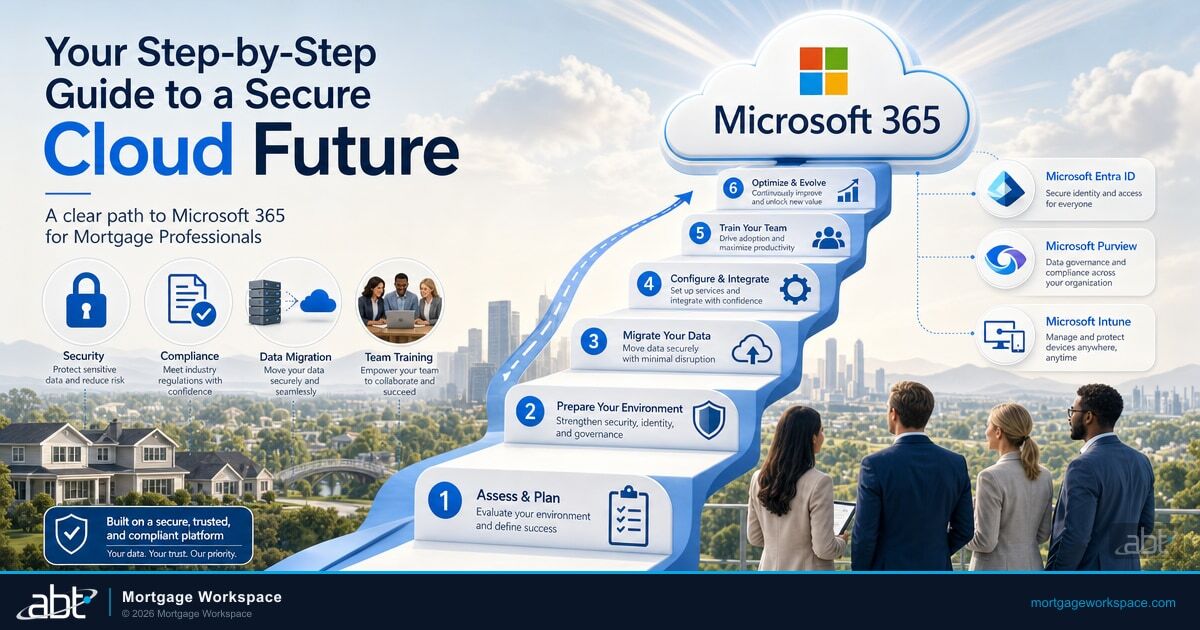
In This Article
- Step 1: Assess Your Current Infrastructure
- Step 2: Plan Your Migration Strategy
- Step 3: Configure Accounts and Licensing
- Step 4: Migrate Email, Files, and Data Securely
- Step 5: Lock Down Security and Compliance
- Step 6: Train Your Team by Role
- Step 7: Post-Migration Optimization
- The ABT Mortgage Microsoft 365 Stack
- Frequently Asked Questions
91% of financial services executives now consider cloud-first infrastructure important for growth. For mortgage companies still running on-premise Exchange servers or legacy file shares, migrating to Microsoft 365 is not a technology upgrade. It is a business decision that affects security, compliance, collaboration, and operating costs.
The challenge is execution. A poorly planned migration creates more problems than it solves. Email goes missing. Permissions break. Compliance policies do not carry over. Staff cannot find their files. The mortgage companies that come through a Microsoft 365 migration with zero surprises share one thing: a Tier-1 Direct-Bill Microsoft Cloud Solution Provider who actually managed the tenant build, not a generic IT shop running a checklist.
This guide walks through the migration process step by step, with specific considerations for mortgage companies that handle borrower PII and operate under GLBA, FTC Safeguards Rule, and state regulatory requirements. Access Business Technologies manages Microsoft 365 tenants for more than 750 financial institutions, with mortgage companies a core part of that footprint. The guide reflects what actually works at that scale.
Step 1: Assess Your Current Infrastructure
Before touching a single mailbox, inventory what you have. This assessment prevents the surprises that derail migrations.
What to document:
- Email system: On-premise Exchange version, number of mailboxes, total storage, largest mailbox sizes, any public folders in use.
- File storage: File server shares, mapped drives, total data volume, which departments own which folders.
- Applications: LOS integrations that depend on on-premise Active Directory, CRM tools that send email through your current server, any applications with SMTP relay dependencies.
- Compliance: Current email retention policies, litigation hold requirements, archive systems, and any eDiscovery dependencies.
- Security: Current authentication methods, VPN configurations, mobile device policies, and any multi-factor authentication already in place.
This inventory tells you the migration scope. A 15-person mortgage broker with 50GB of email is a different project than a 200-person lender with 5TB of historical data and public folder dependencies.
Step 2: Plan Your Migration Strategy
Financial services cloud migration research shows that 86% of successful implementations followed a phased approach. Mortgage companies should plan for three phases, not a weekend cutover.
Phase 1: Foundation (Weeks 1-2). Set up the Microsoft 365 tenant. Configure the domain. Establish hybrid connectivity if needed. Set up Microsoft Entra ID Connect for identity synchronization. This phase has zero user impact. We cover Microsoft 365 for Mortgage Industry in a companion piece.
Phase 2: Pilot migration (Weeks 3-4). Migrate a small group of technically comfortable users. Typically 5-10 people from IT and one branch. Validate email flow, calendar sharing, file access, and mobile connectivity. Fix issues before expanding.
Phase 3: Production migration (Weeks 5-8). Migrate remaining users in waves. One department or branch per wave. Each wave includes validation, user support, and a 48-hour stabilization period before the next wave begins.
Choosing your approach:
- Cutover migration: Move everyone at once. Works for organizations under 150 mailboxes with no complex dependencies.
- Staged migration: Move groups over weeks. Best for larger organizations or those with complex mail routing.
- Hybrid migration: Run on-premise and cloud simultaneously. Required when certain applications cannot move to cloud immediately.
Step 3: Configure Accounts and Licensing
Microsoft 365 licensing for mortgage companies requires more thought than picking the cheapest plan.
Recommended licensing by company size:
- Under 50 users: Microsoft 365 Business Premium. Includes Exchange Online, Microsoft Teams, SharePoint, OneDrive, Microsoft Intune device management, and Microsoft Defender for Office 365. This covers the security and compliance needs of most mortgage brokers and small lenders.
- 50-300 users: Microsoft 365 E3. Adds advanced compliance features, unlimited archive mailboxes, and more granular retention policies.
- 300+ users or advanced security needs: Microsoft 365 E5. Adds Microsoft Defender for Identity, advanced eDiscovery, insider risk management, and Microsoft Sentinel for security monitoring.
Critical configuration steps:
- Create all user accounts before migration begins.
- Assign licenses based on role requirements.
- Set up admin roles: Global Admin (restricted to 2-3 people), Exchange Admin, SharePoint Admin, Security Admin.
- Configure emergency access accounts (break-glass accounts) that bypass MFA for disaster recovery.
Step 4: Migrate Email, Files, and Data Securely
Data migration is where mortgage companies face the most risk. Borrower PII moves across systems. Compliance data must arrive intact. Email history cannot have gaps.
Email Migration
Exchange Online handles email migration through Microsoft native tools or third-party platforms like BitTitan MigrationWiz. Key considerations for mortgage companies:
- Migrate all email, including sent items, drafts, and calendar entries.
- Preserve folder structures so users can find their existing organization.
- Verify that email retention policies carry over correctly.
- Test mail flow rules (auto-forwards, shared mailboxes, distribution lists) after migration.
File Migration
Move file server shares to SharePoint Online (team files) and OneDrive (individual files). Map existing drive letters to SharePoint libraries using OneDrive sync so the transition feels familiar.
- Preserve file permissions during migration.
- Identify and resolve long file paths (SharePoint has a 400-character limit).
- Move active files first, archive historical data separately.
- Verify that LOS integrations can access files in the new location.
Security During Transfer
Microsoft 365 encrypts all data transfers with TLS 1.2 or higher. For mortgage companies, add these safeguards:
- Run migration transfers over encrypted connections only.
- Validate data integrity with checksum comparison after each batch.
- Maintain a complete backup of source data until migration is verified.
- Log every migration action for compliance audit purposes.
Step 5: Lock Down Security and Compliance
This step is not optional for mortgage companies. Configure security before users log in, not after.
Day-one security requirements:
Multi-Factor Authentication. Enable MFA for every user. Financial services organizations that deploy MFA report a 42% reduction in unauthorized access events. Use the Microsoft Authenticator app, not SMS codes (SMS is vulnerable to SIM swapping).
Conditional Access policies. Block logins from countries where you have no employees. Require compliant devices for access to SharePoint sites containing borrower data. Block legacy authentication protocols that bypass MFA.
Data Loss Prevention. Create Microsoft Purview DLP policies that detect borrower PII: Social Security numbers, account numbers, dates of birth. Block external sharing of files containing this data. Alert compliance officers when violations occur.
Email encryption. Enable Microsoft Purview Message Encryption for all outbound email containing sensitive data. Set up transport rules that automatically encrypt messages to borrowers.
Retention policies. Configure Microsoft Purview retention labels for loan correspondence, compliance documentation, and general business email. Map policies to GLBA, FTC Safeguards Rule, and your state-specific requirements.
Step 6: Train Your Team by Role
The fastest way to fail a Microsoft 365 migration is to skip training. The second fastest is to give everyone the same 3-hour general session.
Role-specific training approach:
Loan officers (1 hour): Outlook email and calendar, Microsoft Teams mobile app for client communication, OneDrive for accessing documents from the field, sharing files securely with borrowers via encrypted links.
Processors (1.5 hours): SharePoint document libraries for loan files, Teams channels for pipeline communication, Power Automate basics for status notifications, Microsoft Planner for task management.
Managers (1 hour): Teams admin basics, reporting dashboards, how to request new channels or SharePoint sites, understanding compliance features available to them.
IT staff (4 hours): Microsoft 365 security admin center, Microsoft Purview Compliance Manager, DLP policy management, Conditional Access configuration, incident response procedures in Microsoft 365.
Step 7: Post-Migration Optimization
Migration is the beginning, not the end. The first 90 days after migration determine whether your team adopts the new tools or falls back to old habits.
Week 1-4: Stabilize. Monitor adoption metrics. Track help desk tickets. Identify recurring issues and address them with targeted communication or additional training.
Week 5-8: Optimize. Set up Power Automate workflows for common tasks. Configure Power BI dashboards for loan pipeline visibility. Review and refine Microsoft Purview DLP policies based on actual usage patterns.
Week 9-12: Expand. Deploy SharePoint collaboration sites for specific workflows. Set up external sharing policies for working with title companies and appraisers. Begin exploring Microsoft 365 Copilot features for productivity gains. For ABT's fuller take, see Microsoft 365 Copilot Buyer's Guide for Mortgage Lenders.
The ABT Mortgage Microsoft 365 Stack
The seven steps above describe the work. The next question is who does that work. For mortgage companies the answer matters more than for almost any other vertical, because the migration is not just a tenant build. It is a regulated-environment tenant build with LOS integration, borrower-PII flow, and examiner expectations baked into the configuration.
A Tier-1 Direct-Bill Microsoft Cloud Solution Provider manages the tenant migration directly. Tier-1 Direct-Bill is Microsoft top program tier for Cloud Solution Provider partners. A Direct-Bill partner transacts directly with Microsoft, holds dedicated support engineers, and is operationally accountable to Microsoft for how customer tenants are configured and run. That is fundamentally different from a do-it-yourself migration where the mortgage company assumes the tenant-build risk on its own, and from a generic IT outsourcer who resells Microsoft licenses through another partner but never touches the delegated-admin layer. With ABT as your CSP, the tenant build, the identity layer, the security baseline, and the cutover all happen inside the partner relationship under Granular Delegated Administrative Privileges. The mortgage company keeps its Microsoft 365 licensing, retains tenant ownership, and avoids the rework cycle that ends most DIY migrations. This connects closely to Using Microsoft 365 Solutions Elevate Success for Mortgage Firms.
M365 Guardian, MortgageWorkSpace, and MortgageExchange are ABT productized Microsoft 365 destination for mortgage professionals. M365 Guardian is ABT operating model on top of Microsoft 365 for regulated financial services: firm-specific Conditional Access policies, mortgage-tuned Microsoft Purview DLP for borrower NPI and loan-file data, retention policies aligned to GLBA and state-level recordkeeping, Microsoft Defender and Microsoft Sentinel deployed with mortgage-attack pattern tuning, and the 24/7 security operations layer that watches the signals. MortgageWorkSpace is the dual-brand mortgage vertical where these services land for mortgage companies specifically, with role-based configurations for loan officers, processors, and underwriters. MortgageExchange is the custom interface layer that connects your Microsoft 365 tenant to your loan origination system and downstream core banking, so the migration is not just an email-and-files move but a real productivity unlock across the loan lifecycle. Microsoft handles the platform. ABT handles the mortgage-specific configuration and the day-to-day operating model on top.
Get a Mortgage-Specific Microsoft 365 Migration Plan
ABT runs Microsoft 365 migrations for independent mortgage banks, mortgage brokers, and hybrid LO shops as part of its 750+ financial institution footprint. A 30-minute conversation maps your current infrastructure, scopes a mortgage-tuned tenant build, and outlines what an ABT-managed migration with M365 Guardian, MortgageWorkSpace, and MortgageExchange would cover. No commitment, no quote, no obligation.
Key Takeaway
A Microsoft 365 migration for a mortgage company is a regulated-environment tenant build, not a generic IT project. Phasing, licensing, security baselines, and post-migration training all matter, but they all live inside a CSP relationship that either has mortgage-vertical expertise or does not. A Tier-1 Direct-Bill CSP that manages the tenant migration directly, layers M365 Guardian on top, lands the team inside MortgageWorkSpace, and wires MortgageExchange into the LOS, turns the migration from a project risk into a productivity unlock that pays back in adoption and audit readiness.
Frequently Asked Questions
Migration costs depend on the number of users, volume of data, complexity of existing systems, and whether third-party migration tools are needed. Licensing starts at approximately $22 per user per month for Microsoft 365 Business Premium. Migration project costs vary based on scope, but working with a Tier-1 Direct-Bill CSP that manages the tenant migration directly reduces the total cost by preventing rework and accelerating the timeline. ABT prices mortgage migrations as a single managed engagement that covers the tenant build, identity layer, security baseline, cutover, and post-migration optimization, rather than as a series of consulting-hour line items.
Most modern LOS platforms, including Encompass, Calyx, and LendingPad, work with Microsoft 365 through email integration, document storage via SharePoint and OneDrive, and single sign-on through Microsoft Entra ID. Older LOS installations that depend on on-premise Active Directory may require a hybrid configuration where both cloud and on-premise identity systems run simultaneously. ABT goes a step further with MortgageExchange, which is the custom interface that connects your LOS to your Microsoft 365 tenant and downstream core banking so the loan lifecycle moves through one platform rather than through stitched-together email attachments.
Microsoft 365 includes multi-factor authentication, Conditional Access policies, Microsoft Purview Data Loss Prevention for detecting borrower PII, email encryption through Microsoft Purview Message Encryption, retention policies for regulatory record-keeping, audit logging for every file and email action, and Compliance Manager with built-in assessments for FFIEC and GLBA frameworks. These features ship inside the tenant. The mortgage-specific configuration on top of them is where ABT M365 Guardian operating model adds value, with mortgage-tuned DLP, Conditional Access, and retention policies wired in during the migration rather than retrofitted later.
A single-office mortgage company with under 50 users typically completes migration in four to six weeks, including planning, execution, and training. Multi-branch operations with 100 to 300 users take eight to twelve weeks with phased rollouts. Organizations with complex hybrid requirements or large data volumes may need three to four months for a complete migration, including post-migration optimization. ABT shortens that timeline for mortgage companies by reusing the MortgageWorkSpace baseline configuration that already covers the mortgage-vertical decisions, so the migration is not redesigning the wheel for every customer.
A Tier-1 Direct-Bill Cloud Solution Provider transacts directly with Microsoft and is operationally accountable to Microsoft for how customer tenants are configured and run. A generic IT provider typically resells Microsoft licensing through another partner and does not hold the delegated-admin relationship with each customer tenant. For a mortgage company the difference is structural: a Tier-1 Direct-Bill CSP manages your Microsoft 365 tenant under Granular Delegated Administrative Privileges, applies the firm-wide security baseline, handles ongoing optimization, and produces the configuration evidence your compliance team needs. ABT is one of the few Tier-1 Direct-Bill CSPs dedicated to financial services and is the largest in the mortgage vertical.
MortgageWorkSpace is the ABT-managed Microsoft 365 destination specifically for mortgage professionals. The migration lands your loan officers, processors, underwriters, and managers inside a Microsoft 365 tenant that has the mortgage-vertical configuration in place from day one: role-based access patterns, mortgage-tuned Microsoft Purview DLP and retention, LOS integration through MortgageExchange, and the M365 Guardian operating model on top of Microsoft Defender, Microsoft Sentinel, and Microsoft Entra ID. The result is that the migration is not just a platform move. It is a move into a mortgage-ready productivity environment.