In This Article
- The Standing Access Problem in Mortgage IT
- How Just-in-Time Admin Access Works
- Microsoft Entra ID PIM: The JIT Engine for Mortgage Admin Access
- Compliance Requirements JIT Satisfies
- Four Implementation Models for Mortgage Companies
- Five-Step JIT Rollout Plan
- M365 Guardian and MortgageExchange: ABT's Productized JIT Admin Baseline
- Frequently Asked Questions
A mortgage company that runs Microsoft 365 with five standing Global Admin accounts cannot pass a clean GLBA exam. The Loan Officer's manager who has Exchange Admin access for one quarterly batch job. The compliance auditor with permanent eDiscovery rights. The departed contractor whose Security Admin role survived two onboarding cycles. Each of these accounts is an attacker's permanent target and an examiner's recurring finding. Access Business Technologies manages Microsoft 365 tenants for more than 750 financial institutions, and the mortgage companies in that footprint share one common control: privileged access is eligible, not standing.
Why ABT Runs Just-in-Time Admin for Mortgage Companies
- Microsoft Entra ID Privileged Identity Management (PIM) moves Global Admin, Exchange Admin, Security Admin, and SharePoint Admin from standing accounts to eligible-only assignments with time-bound activation, approval workflows, and MFA at the moment of elevation.
- M365 Guardian, ABT's operating model on top of Microsoft 365, applies the PIM baseline consistently across every mortgage tenant ABT manages, monitors activation events in real time, and produces the access-review evidence GLBA, FFIEC, NCUA, and state examiners expect.
- MortgageExchange, ABT's custom LOS-to-core interface, runs under the same least-privilege model so the integration accounts that move loan data into core banking systems never carry standing tenant admin rights.
For a mortgage company that operates through a network of branches, loan officer assistants, third-party processors, and IT contractors, just-in-time admin access converts the largest standing risk in the tenant into a logged, approved, time-boxed activity. The company experiences faster examiner cycles, fewer findings, and the productivity gain that comes from no longer chasing dormant admin accounts every quarter.
This article explains how just-in-time admin access works inside Microsoft Entra ID PIM, how the pattern maps to GLBA, SOX, FFIEC, and NCUA requirements that mortgage lenders face, four implementation models for mortgage companies, a five-step rollout plan, and how ABT productizes the whole baseline through M365 Guardian and MortgageExchange for the 750+ financial institutions ABT manages.
The Standing Access Problem in Mortgage IT
Standing admin access means someone holds elevated permissions twenty-four hours a day, whether they are actively using them or not. In a typical mortgage company, this looks like loan operations managers carrying Global Admin rights from a long-finished project, compliance auditors with permanent Exchange Admin access, and IT contractors whose admin accounts outlived the engagement that created them.
Each of those accounts is a target. If an attacker steals those credentials through phishing or credential stuffing, they inherit every permission the account holds. No time limit. No approval required. No audit trail beyond the initial login. The compliance failure mode is just as predictable: an examiner pulls the privileged-account list, finds eight standing Global Admins where the firm's written policy allows two, and the firm spends the next ninety days documenting compensating controls instead of closing loans. We cover Mortgage Compliance Made Simple in a companion piece.
The Zero Trust Report found that only 17 percent of organizations have fully implemented Universal ZTNA despite 82 percent calling it essential. The gap is 65 percentage points. Over-privileged access is the most common reason organizations stall on Zero Trust implementation, and standing admin accounts are the most visible form of over-privilege in any Microsoft 365 tenant.
How Just-in-Time Admin Access Works
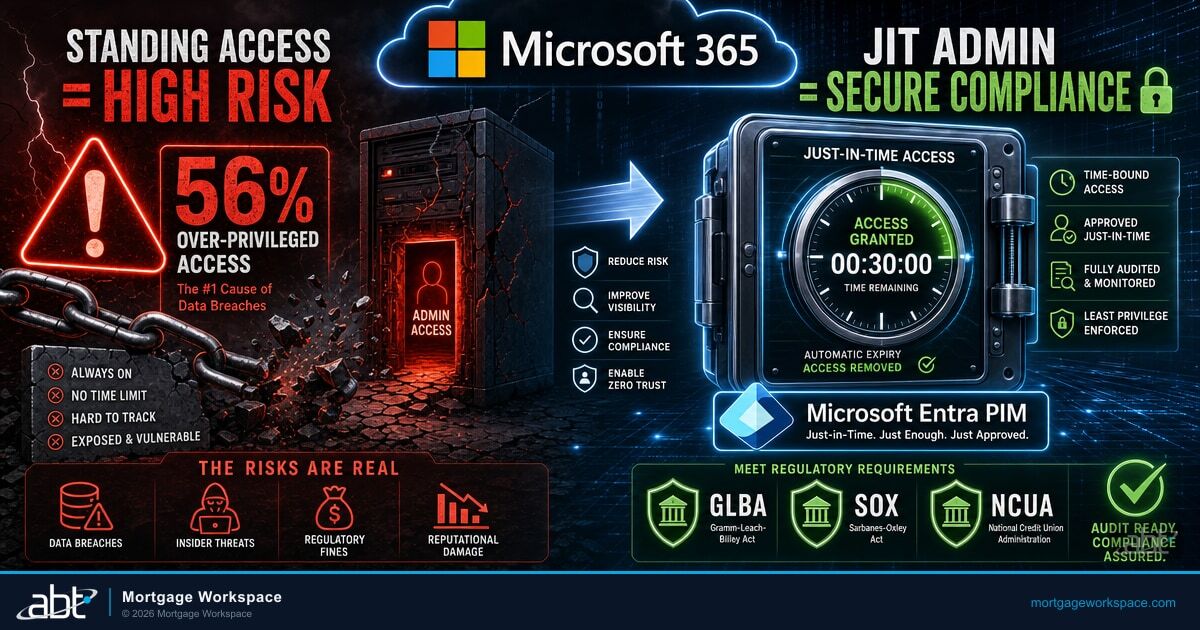
Just-in-time access replaces permanent admin rights with a request-and-approve workflow that produces audit evidence at every step. The concept is simple:
- A user requests elevated access for a specific task.
- They provide a business justification explaining why they need it.
- An approver reviews and grants or denies the request.
- If approved, the elevated permissions activate for a defined time window.
- When the window closes, permissions automatically revoke.
- Every step is recorded in the Microsoft Entra ID audit log and Microsoft Purview Audit.
The user never holds standing privileges. The attack window shrinks from "always" to "only during approved activations." The audit trail shows exactly who had what access, when, and why, in the form an examiner can hand back as evidence of working controls.
Microsoft Entra ID PIM: The JIT Engine for Mortgage Admin Access
Microsoft Entra ID Privileged Identity Management is the just-in-time engine built into Microsoft 365 and Microsoft Entra ID. PIM requires either a Microsoft Entra ID P2 license or a Microsoft Entra ID Governance license, both of which sit inside the Microsoft 365 E5 stack or are available as add-ons against Business Premium and E3. For mortgage companies, the practical capability set is the part that matters at exam time.
Microsoft Entra ID PIM lets the tenant administrator mark users as eligible for a directory role (Global Administrator, Exchange Administrator, Security Administrator, SharePoint Administrator, Compliance Administrator, and roughly eighty other roles) without granting active permissions. When the eligible user needs the role, they sign in to the Entra admin center, request activation, document a business justification, complete MFA at the moment of elevation rather than at first login, and wait for an approver to grant or deny the activation. Activation windows are configurable from thirty minutes to twenty-four hours per role. When the window closes, the role automatically deactivates and the user returns to standing standard-user permissions. Microsoft Entra ID Conditional Access wraps the activation flow with policy rules that enforce MFA strength, device-compliance state, sign-in risk level, and named-location filters, which lets a mortgage company require, for example, that any activation of Global Administrator must come from a Microsoft Intune-enrolled corporate device on a managed network with phishing-resistant MFA. Every step in the request, approve, activate, and deactivate sequence writes to the Entra ID audit log and to Microsoft Purview Audit, producing the time-stamped trail that GLBA, SOX, FFIEC, and NCUA examiners ask for. This connects closely to Navigating Compliance Challenges in Mortgage Management.
Key Microsoft Entra ID PIM Capabilities for Mortgage Companies
- Eligible assignments. Users are marked as eligible for a role but do not hold it actively. They must request activation when they need it.
- Time-bound activation. Set activation windows from thirty minutes to twenty-four hours per role. A compliance auditor who needs Exchange Admin access for a review gets a two-hour window, not permanent rights.
- Approval workflows. Require one or more approvers before elevation activates. Route approval to security officers, compliance leads, or branch IT managers based on the role.
- MFA at activation. Force multi-factor authentication at the moment of elevation, not just at login. This blocks attackers who hold stolen session tokens or refresh tokens.
- Conditional Access enforcement. Pair activation with Microsoft Entra ID Conditional Access policies that require Intune-compliant devices, phishing-resistant MFA, and named-location filters for high-risk roles.
- Justification tracking. Require users to document why they need the access. These justifications become part of the Microsoft Purview audit record.
- Access reviews. Schedule periodic reviews of who is eligible for which roles. Remove eligibility for users who no longer need it.
PIM for Groups
Microsoft Entra ID PIM also supports group-based access. Create a security group mapped to a set of permissions, then manage group membership through PIM. Users request membership, get approved, and receive time-limited access to everything the group controls. One activation grants access to multiple resources, which simplifies the operating model for branch-level admin scenarios.
Compliance Requirements JIT Satisfies
Just-in-time admin access maps directly to requirements across the regulatory frameworks that mortgage companies face.
| Regulation | What It Requires | How JIT in Microsoft Entra ID PIM Satisfies It |
|---|---|---|
| GLBA Safeguards Rule | Administrative, technical, and physical safeguards for customer information; documented access controls. | PIM enforces least-privilege access with documented approval workflows, automatic expiration, and time-stamped activation logs in Microsoft Purview Audit. |
| SOX Section 404 | Internal controls over financial reporting and access management for publicly held mortgage companies. | PIM activation logs document who accessed financial systems, when, with what justification, and under what approval. |
| FFIEC IT Examination Handbook | Access controls that limit privileges to the minimum needed and demonstrate periodic access reviews. | PIM eligible-only model and access-review feature directly satisfy the "least privilege" and "access review" requirements banks and credit unions face during IT examinations. |
| NCUA Cybersecurity Examination Expectations | Credit unions must demonstrate that privileged access is managed, monitored, and reviewed. | PIM activation history and Microsoft Purview Audit logs provide the evidence NCUA examiners ask for. |
| State Cybersecurity Rules (California CCPA amendments, New York DFS 23 NYCRR Part 500) | Privilege limitation, multi-factor authentication on privileged accounts, and access logging. | PIM with Conditional Access enforces MFA at elevation, limits activation windows, and writes audit evidence to Microsoft Purview Audit. |
Four Implementation Models for Mortgage Companies
Model 1: Admin-Only JIT. Start with Global Admin, Exchange Admin, SharePoint Admin, and Security Admin roles. This is the highest-risk, highest-value starting point. Most mortgage companies have three to eight standing admin accounts that should be converted to eligible assignments.
Model 2: Compliance Auditor JIT. Give the compliance team eligible access to audit logs, eDiscovery, and Microsoft Purview. They activate when running reviews and lose access when reviews end. This satisfies the separation-of-duties pattern many examiners check.
Model 3: Third-Party Contractor JIT. External IT consultants and managed service providers get eligible assignments rather than standing access. Activation requires internal approval, and the window matches the contracted service period. Third-party access is implicated in a substantial share of mortgage industry breaches.
Model 4: Full-Stack JIT. Extend just-in-time admin to every elevated role in the tenant. This includes Application Administrator, Teams Administrator, Intune Administrator, and SharePoint Administrator. Requires mature change management processes but delivers the strongest compliance posture and the cleanest examiner walkthrough. For ABT's fuller take, see DLP and the Role of Technology in Modern Mortgage Compliance.
Five-Step JIT Rollout Plan
Step 1: Audit current admin accounts. Run an access review to identify every account with standing admin privileges. Microsoft recommends limiting privileged role assignments to fewer than ten per tenant. Most mortgage companies exceed this when they first audit.
Step 2: Convert high-risk roles first. Move Global Admin and Security Admin accounts to eligible assignments in PIM. Set activation windows between one and four hours. Require MFA at activation and require Intune device compliance through Microsoft Entra ID Conditional Access.
Step 3: Define approval workflows. For each role, designate at least two approvers. Document who approves what and the expected response time. Publish the workflow so the team knows the process before they need it.
Step 4: Enable notifications and monitoring. Configure PIM to send alerts when privileged roles are activated. Route these to the security team, a Microsoft Sentinel workspace, or an external SIEM for real-time monitoring.
Step 5: Schedule quarterly access reviews. Use Microsoft Entra ID PIM access reviews to evaluate whether each eligible assignment is still needed. Remove eligibility for users who have not activated in ninety days. Document review outcomes for the audit file.
Standing admin access is the single largest exam-finding generator inside a mortgage company tenant. Just-in-time admin closes it without slowing the business down.
M365 Guardian and MortgageExchange: ABT's Productized JIT Admin Baseline
Microsoft Entra ID PIM is the engine. M365 Guardian is ABT's operating model that productizes the just-in-time admin baseline across the 750+ financial institutions ABT manages, and MortgageExchange, ABT's custom LOS-to-core integration product, runs under the same least-privilege contract so the integration accounts that move loan data between LOS and core banking systems never carry standing tenant admin rights. The pattern looks the same in every mortgage tenant ABT operates: Global Administrator, Exchange Administrator, Security Administrator, and SharePoint Administrator are PIM-eligible only, activation windows are tuned to actual mortgage workflows (one hour for routine compliance lookups, four hours for batch operations, twenty-four hours for migration events with extra approver scrutiny), Conditional Access wraps activation with Microsoft Intune device compliance and phishing-resistant MFA, and Microsoft Purview Audit retains the activation history for the multi-year window mortgage examiners need. ABT applies the baseline as part of standard managed-service onboarding, monitors activation events through the Guardian operating center, and runs the quarterly access reviews on behalf of the firm so the compliance team walks into examinations with the evidence already produced and stored in Microsoft Purview.
Get a Just-in-Time Admin Readiness Review for Your Mortgage Tenant
ABT runs the Microsoft Entra ID PIM and M365 Guardian operating model described in this article for mortgage lenders, banks, and credit unions across the country. A thirty-minute conversation maps the firm's current privileged-account footprint, surfaces the standing-admin findings the next exam is most likely to produce, and outlines what an ABT-managed deployment of just-in-time admin would cover. No commitment, no quote, no obligation.
Frequently Asked Questions
Just-in-time admin access grants elevated permissions only when a user needs them and revokes them automatically when the task is complete. Instead of holding permanent admin rights, users request activation through an approval workflow inside Microsoft Entra ID Privileged Identity Management. Every activation is logged in the Entra ID audit log and Microsoft Purview Audit with timestamps, justifications, and approver identities, creating the audit trail that mortgage compliance examiners under GLBA, FFIEC, and NCUA expect.
Microsoft Entra ID Privileged Identity Management marks users as eligible for roles without granting active permissions. When users need access, they request activation through the Microsoft Entra admin center, provide a business justification, and pass MFA verification at the moment of elevation. An approver reviews the request, and if granted, the role activates for a defined time window (thirty minutes to twenty-four hours) before automatically expiring. Conditional Access policies in Microsoft Entra ID can wrap the activation with device-compliance, named-location, and sign-in risk requirements.
The GLBA Safeguards Rule, SOX Section 404 for publicly held mortgage companies, the FFIEC IT Examination Handbook, NCUA cybersecurity examination expectations, and state regulations including California CCPA cybersecurity audit amendments and New York DFS 23 NYCRR Part 500 all require or recommend least-privilege access controls. Just-in-time admin access through Microsoft Entra ID PIM satisfies these requirements by eliminating standing privileges, enforcing approval workflows, and producing time-stamped audit logs that examiners accept as evidence.
Microsoft Entra ID PIM requires either a Microsoft Entra ID P2 license or a Microsoft Entra ID Governance license. Both sit inside the Microsoft 365 E5 stack and are also available as add-on subscriptions against Microsoft 365 Business Premium and E3. The license tier enables eligible role assignments, time-bound activation, approval workflows, access reviews, and the audit history capabilities that support compliance documentation for mortgage regulatory examinations.
ABT manages Microsoft 365 tenants for more than 750 financial institutions and applies a single just-in-time admin baseline across the mortgage companies in that footprint through the M365 Guardian operating model. Global Administrator, Exchange Administrator, Security Administrator, and SharePoint Administrator are PIM-eligible only, activation windows are tuned to mortgage workflows, Conditional Access enforces Intune device compliance and phishing-resistant MFA at elevation, and Microsoft Purview Audit retains the activation history for the multi-year window mortgage examiners need. ABT applies the baseline at managed-service onboarding, monitors activation events through the Guardian operating center, and runs the quarterly access reviews on behalf of the firm. MortgageExchange, ABT's custom LOS-to-core integration product, runs under the same least-privilege model so the integration accounts that move loan data into core banking systems never carry standing tenant admin rights.
Yes. External IT consultants and managed service providers should be assigned to Microsoft Entra ID PIM eligible roles rather than given standing admin accounts. Activation requires internal approval and the activation window can be tuned to the contracted service period. The audit log captures every activation with the contractor identity, business justification, approver identity, and the work performed during the elevation window. Third-party access is implicated in a substantial share of mortgage industry breaches, which is why examiners under amended Regulation S-P and the FFIEC IT Examination Handbook expect mortgage companies to document and oversee the privileged access vendors hold.
Key Takeaway
Standing admin access is the single largest exam-finding generator inside a mortgage company Microsoft 365 tenant. Just-in-time admin access through Microsoft Entra ID PIM, wrapped with Microsoft Entra ID Conditional Access and logged into Microsoft Purview Audit, closes the standing-privilege gap and produces examiner-grade evidence as a byproduct. ABT operationalizes the whole baseline through M365 Guardian and runs it consistently across the mortgage tenants in a 750+ financial institution footprint so the firm walks into a GLBA, FFIEC, NCUA, or state exam with the access-review history already produced.