In This Article
Microsoft completed the global rollout of AI Workflows for Teams in February 2026. Copilot now runs scheduled prompts inside Teams channels, delivering automated weekly summaries, pipeline updates, and compliance monitoring without anyone clicking a button. Microsoft 365 Copilot hit 15 million paid seats as of the January 28, 2026 earnings call. IDC projects 1.3 billion enterprise agents by 2028. The shift from "bots that respond" to "agents that act" is production reality.
HumAI research shows agentic workflows deliver 30% to 50% faster business processes and a 25% to 40% reduction in low-value work. One global firm cut audit reporting time by 92%. For mortgage operations—where loan officers, processors, and underwriters already live in Teams—this is not a future promise. It is a deployment decision.
Most mortgage companies treat Teams as a communication tool when it can be an automation platform. Your team already lives there—loan officers chat with processors, managers run pipeline meetings, compliance sends reminders. This guide covers how to build mortgage-specific Teams agents that automate task assignment, document tracking, status updates, and compliance notifications without replacing your existing systems.
From Teams Bots to Teams Agents: What Changed
The terminology shift from "bot" to "agent" is not cosmetic. Traditional Teams bots followed scripts: if the user says X, respond with Y. They handled simple commands and basic notifications. Useful, but limited.
Teams agents built on Copilot Studio do something different. They reason about context, access multiple data sources, and take actions across systems. An agent does not just tell your processor a document is missing. It checks SharePoint for the document, verifies the borrower portal for uploads in progress, sends a follow-up request if nothing is found, and updates the loan status in Dynamics 365.
Traditional Teams Bot
- Script-based: if X, respond Y
- Single data source per interaction
- Cannot take actions across systems
- Requires developer for every change
- No context awareness between sessions
Copilot Studio Agent (2026)
- Reasons about context and intent
- Queries multiple systems simultaneously
- Takes actions: creates records, routes files, sends alerts
- No-code visual builder for operations managers
- Multi-agent orchestration and MCP integration
Four capabilities make this possible in 2026:
Multi-agent orchestration. One agent can call other agents. A "loan intake agent" delegates to a "document agent" and a "notification agent" without sharing the same code base. Each agent handles its specialty.
MCP integration. The Model Context Protocol lets Teams agents connect to external tools, CRM systems, and custom databases without building custom API integrations for each one. The Power Apps MCP Server, now in public preview, lets agents perform data entry directly inside business applications.
Human-in-the-loop controls. Copilot Studio's "request for information" action pauses an agent flow to collect details from a designated reviewer through Outlook, then resumes execution using their response. This solves the compliance concern of fully autonomous agents making decisions about loan files without human oversight.
No-code agent builder. Copilot Studio provides a visual interface where you define triggers, actions, and decision logic. Your operations manager can build and modify mortgage agents without writing code.
The Mortgage Task Assignment Problem
Manual task assignment in mortgage operations creates three specific problems that Teams agents solve directly:
A processing manager assigns files manually based on who they remember being available. Some processors carry 40 files while others carry 15. The manager has no dashboard showing real-time capacity—just a mental model that gets less accurate with every assignment.
Quality drops on the overloaded side. Time gets wasted on the underloaded side. When a file moves from processing to underwriting, the gap between completion and reassignment averages 4 to 8 hours. Over a 30-day loan cycle, those handoff gaps add up to 2 to 3 days of dead time per file.
The third problem is invisible until an examiner finds it: no audit trail for assignments. When a compliance examiner asks why a specific underwriter reviewed a specific file, you need a documented answer. Manual assignment creates no record. Automated assignment in Teams creates a timestamped, searchable log of every routing decision.
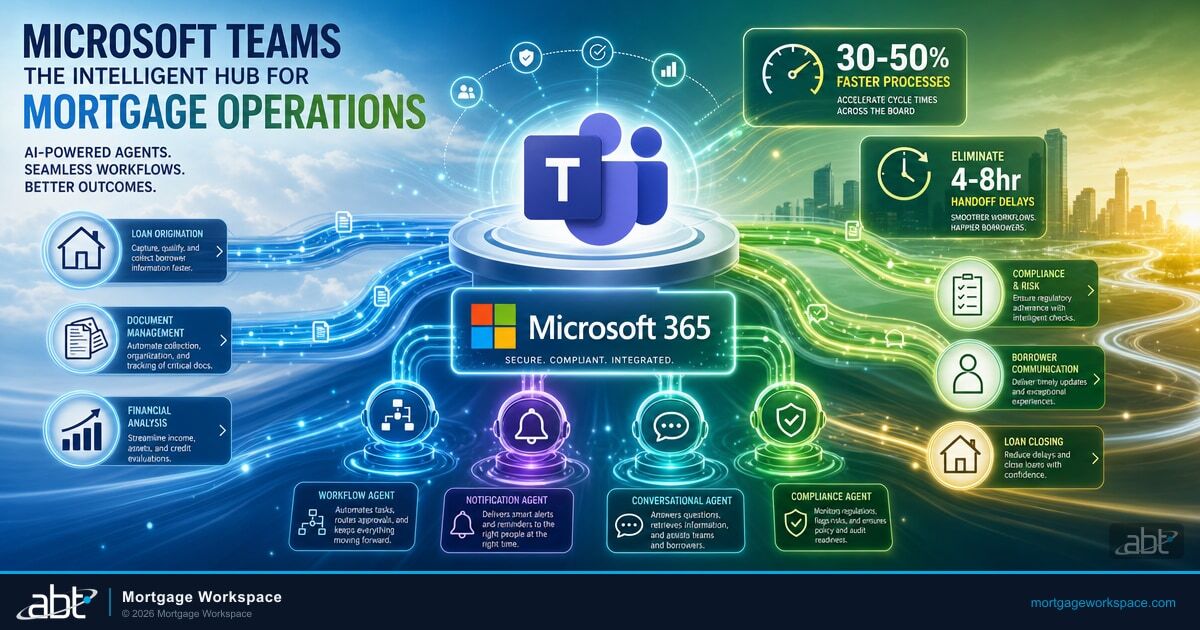
Four Teams Agent Types for Mortgage Operations
| Agent Type | What It Does | Key Integrations | ROI Driver |
|---|---|---|---|
| Workflow | Routes files to next responsible party based on capacity, specialty, and loan product | Dynamics 365, LOS | Eliminates 4-8 hr handoff delays |
| Notification | Sends targeted alerts with deep links: doc received, condition set, rate lock warning | SharePoint, Dynamics 365 | Saves 15-20 min per loan |
| Conversational | Answers status queries: "What's the status of the Garcia loan?" with live data | Dynamics 365, SharePoint, LOS | Eliminates status-check meetings |
| Compliance | Monitors TRID deadlines, HMDA data quality, state-specific doc requirements | Compliance engine, Dynamics 365 | Prevents regulatory findings |
Workflow agents monitor loan status changes in Dynamics 365 and route files to the next responsible party based on rules you define: product type, loan amount, processor capacity, or underwriter specialty.
Notification agents send targeted alerts to the right people at the right time. Document received, condition set, rate lock approaching expiration, compliance deadline in 48 hours. Each notification includes a deep link to the relevant record so the recipient goes straight to work without searching.
Conversational agents answer questions from your team. "What is the status of the Garcia loan?" The agent queries Dynamics 365, checks SharePoint for recent document activity, and responds with a summary: current stage, next required action, who is responsible, and what the deadline is.
Compliance agents monitor regulatory requirements and flag issues before they become findings. TRID disclosure deadlines, HMDA data quality checks, state-specific documentation requirements. The agent compares loan data against compliance rules and alerts the responsible party when something needs attention.

Ready to Build Your First Teams Agent?
ABT configures Copilot Studio, connects your LOS and SharePoint, and manages the entire agent stack for 750+ financial institutions.
Agent Use Cases: Intake, Documents, Underwriting, Closing
Loan Application Intake
When a new application arrives, the intake agent performs six actions in under 30 seconds:
- Creates a loan record in Dynamics 365 with borrower information, loan type, and source channel
- Creates a SharePoint folder with the standard subfolder structure: application, income, assets, property, disclosures, closing
- Posts a notification in the appropriate Teams channel with borrower name, loan amount, product type, and a link to the Dynamics record
- Assigns the file to a loan officer based on territory rules or round-robin distribution
- Sends a borrower welcome message with instructions for document upload and portal access
- Creates initial tasks in Dynamics 365: order credit report, send pre-qualification letter, schedule introductory call
Without the agent, this sequence takes a loan officer 20 to 30 minutes of manual setup. With the agent, the loan officer receives a Teams notification saying "New application assigned to you" with everything already configured.
Document Tracking and Reminders
Document collection is where processors spend the most time and where loans stall the longest. A document tracking agent changes the equation.
Graduated Reminder Sequence
The agent sends escalating follow-ups automatically. Day 3: friendly reminder to the borrower with the specific missing documents listed. Day 5: follow-up with urgency and the upload link. Day 7: alert to the loan officer that the borrower is non-responsive. Each reminder references only the outstanding items—not the full checklist.
The agent maintains a checklist of required documents by loan type in Dynamics 365. When a document is uploaded to SharePoint, the agent identifies the document type (pay stub, W-2, bank statement), updates the checklist, and notifies the processor that the item has been received.
The processor's dashboard in Teams shows a visual status of every loan's document completion percentage. Green means ready. Yellow means waiting on 1 to 2 items. Red means stalled.
Underwriting File Routing
When a processor marks a file as "submission-ready" in Dynamics 365, the routing agent takes over. It evaluates three factors: underwriter workload (current file count), product specialty (conventional, FHA, VA, jumbo), and loan complexity (exceptions, manual underwrite flags). It assigns the file to the underwriter with the best fit and lowest current workload.
The underwriter receives a Teams notification with a pre-built summary: borrower name, loan amount, product type, DTI ratio, LTV, and links to the complete file in SharePoint. Conditions set by the underwriter flow back through the agent, which creates tasks for the processor and notifies the loan officer.
Turn time tracking starts automatically when the file enters the underwriting queue and stops when the decision is rendered. Power BI dashboards display average turn times by underwriter, product type, and complexity level.
Closing Coordination
Clear-to-close triggers the most coordination-intensive phase. The closing agent handles scheduling, notifications, and checklist management.
When a loan hits "cleared to close" in Dynamics 365, the agent sends notifications to the title company, settlement agent, and borrower with proposed closing dates. It tracks responses and escalates if confirmations are not received within 24 hours.
A closing checklist in Teams tracks every requirement: final title commitment, homeowner's insurance binder, flood certification, closing disclosure delivery, and wire instructions. Each checklist item has a responsible party and deadline. The agent sends reminders for items approaching their deadline and alerts the closer when everything is complete.
Post-closing, the agent triggers the servicing transfer workflow, sends the borrower a welcome-to-servicing message, and creates a 6-month follow-up task for the loan officer.
Building Your First Mortgage Teams Agent
Start with one agent that solves one problem. The notification agent is the best starting point because it delivers immediate value with the lowest implementation risk.
Week 1: Define
Map the loan events that trigger notifications: new application, document uploaded, condition set, rate lock warning, clear to close. Decide who receives each alert.
Week 2: Build
Use Copilot Studio's visual builder. Connect Dynamics 365 and SharePoint. Configure notification templates with the data fields your team needs.
Week 3: Pilot
Run the agent for 3 to 5 loan officers and their processors. Collect feedback on notification frequency, content, and timing. Adjust before full rollout.
Week 4: Deploy
Enable for all users. Monitor adoption in the Teams admin center. Gather feedback during the first full production cycle. Plan your second agent.
After the notification agent is stable, build the workflow agent for task assignment. Then the conversational agent for status queries. Each new agent builds on the data connections you established in the first one.

Teams agents are not replacements for your loan officers, processors, or underwriters. They handle the repetitive coordination work so your team can focus on decisions and relationships that close loans.
For mortgage companies already using Microsoft 365 for compliance, agents extend what you already own. For those exploring cloud migration, Teams agents are one more reason the Microsoft ecosystem delivers compounding returns as you consolidate.
"Most mortgage companies we work with have 3 to 5 manual handoff points per loan that add days to their cycle time. A single Teams workflow agent typically eliminates 2 to 3 of those handoffs in the first month."
Serving 750+ financial institutions since 1999
Build Teams Agents That Eliminate Manual Handoffs
ABT configures Copilot Studio, connects your Dynamics 365 and SharePoint environments, implements security governance through Agent 365, and manages the entire stack long-term.
Frequently Asked Questions
No. Copilot Studio provides a no-code visual builder where operations managers can create agents using drag-and-drop triggers, actions, and decision logic. For complex integrations with custom LOS platforms, a developer or implementation partner may be needed for the initial API connection, but ongoing agent management requires no coding skills.
Teams agents connect to mortgage software through Power Automate connectors, custom APIs, and the Model Context Protocol. Encompass, Byte, and other LOS platforms expose APIs that agents can query for loan status, document data, and borrower information. The agent acts as a bridge that pulls data from your LOS and delivers it through Teams notifications and conversations.
Most mortgage companies see measurable productivity gains within 30 to 60 days of deploying their first Teams agent. Notification agents eliminate 15 to 20 minutes of manual communication per loan. Workflow agents reduce handoff delays by 4 to 8 hours per file. Full ROI across all agent types typically materializes within 6 to 12 months depending on loan volume and implementation scope.
Yes. Teams agents operate within the Microsoft 365 security perimeter, which includes Entra ID authentication, Conditional Access policies, and data loss prevention through Purview. Agent 365 provides governance controls for monitoring agent activity, managing permissions, and ensuring agents only access authorized data. These controls support GLBA and FTC Safeguards Rule requirements for mortgage data protection.
Yes. Multi-agent orchestration lets one agent call other agents to complete complex tasks. A loan intake agent can delegate document setup to a document agent, notification delivery to a notification agent, and task creation to a workflow agent. Each agent specializes in its function while the orchestration layer coordinates the full sequence across your lending pipeline.