In this guide:
Moving Encompass to a hosted environment sounds straightforward. ICE Mortgage Technology provides the application. A hosting provider gives you the infrastructure. Your loan officers log in and originate. In practice, the gap between "Encompass is installed on a server" and "Encompass runs well in a hosted environment that satisfies your compliance requirements" is where most implementations hit problems.
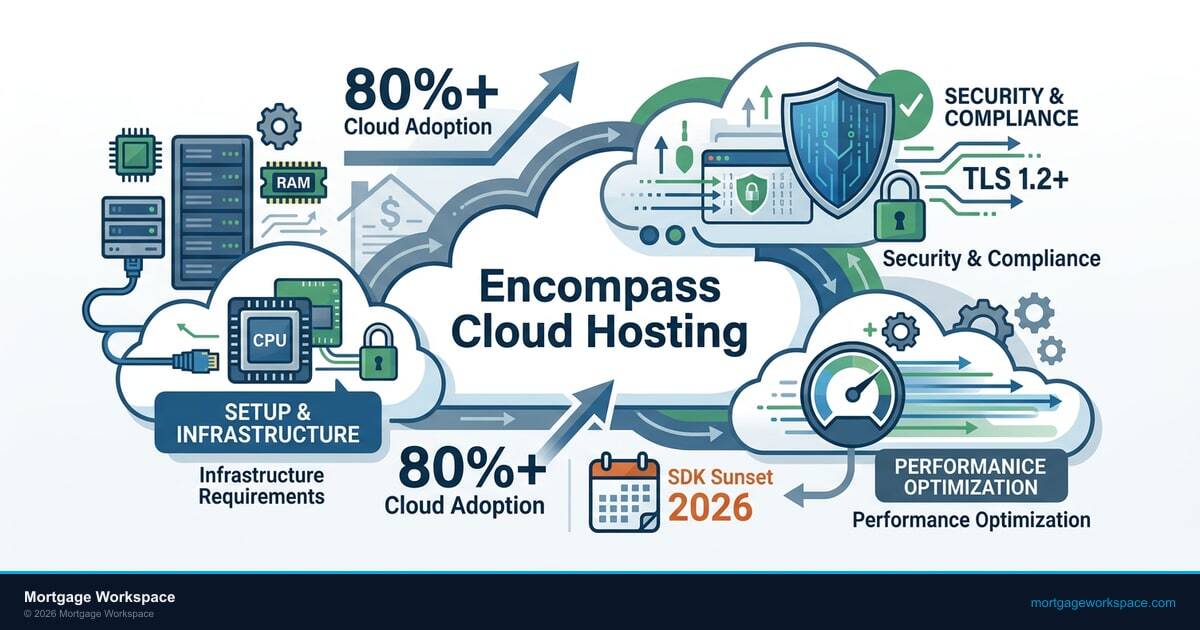
This guide covers the infrastructure decisions you need to get right during your Encompass cloud hosting setup, the security configurations your compliance team will ask about, and the performance tuning that keeps loan officers from calling IT every time the system lags during a rate lock.
Encompass Hosting Models: What You're Actually Choosing Between
Before you configure anything, you need to understand the three ways Encompass gets hosted and what each one means for your IT team.
ICE Mortgage Technology Cloud (Encompass SaaS)
ICE Mortgage Technology hosting runs Encompass in their own cloud infrastructure. You get a web-based interface. ICE handles updates, patches, and infrastructure maintenance. Your IT team manages user provisioning, security policies, and integrations. This is ICE's preferred model going forward, and most new Encompass deployments use it.
The tradeoffs: you have less control over infrastructure timing (ICE pushes updates on their schedule), customization is more limited than a self-hosted SmartClient deployment, and you're dependent on ICE's uptime for your entire origination operation.
Third-Party Hosted (Virtual Desktop / Cloud Server)
A hosting provider runs Encompass SmartClient on virtual desktops or cloud servers that your team accesses remotely. You or your hosting provider manage the OS, patches, networking, and security. ICE manages the Encompass application and database. This connects closely to Email Security for Mortgage Lenders.
This model gives you more control over the infrastructure layer. You choose the hosting provider, control patch timing, configure network security, and manage integrations on your terms. It also means you're responsible for more. Server sizing, backup configuration, disaster recovery, and security hardening are on your plate, not ICE's.
On-Premise (Self-Hosted)
You run Encompass SmartClient on servers in your own data center or server room. Full control, full responsibility. This model is shrinking as ICE pushes toward cloud, but some larger lenders still use it for regulatory or data residency reasons.
The Encompass cloud vs on-premise decision comes down to control versus convenience. If you're reading this guide, you're probably evaluating or already running one of the first two cloud models. The configuration decisions below apply to both ICE's cloud offering and third-party hosted environments, with notes where they diverge.
Infrastructure Requirements for Encompass Cloud Hosting
Getting the infrastructure wrong means loan officers wait. Rate locks take 30 seconds instead of 3. Documents upload at half speed. The system freezes during high-volume periods. Here's what you need to size correctly.
Server Specifications (Third-Party Hosted)
If you're running Encompass SmartClient on hosted virtual desktops or cloud servers, these are the real-world Encompass server requirements that actually work in production (not the minimums ICE publishes, which assume ideal conditions):
- CPU: 4 vCPUs per concurrent user session minimum. Encompass is CPU-intensive during document generation, fee calculations, and compliance checks. If your loan officers run Encompass alongside Outlook and a browser, plan for 6 vCPUs per session.
- RAM: 8 GB per session minimum, 16 GB recommended. SmartClient memory consumption increases over the course of a day as loan files are opened and closed. Loan officers who work 20+ files per day will hit 12-14 GB by end of day if you don't configure session recycling.
- Storage: SSD only. Encompass generates and accesses large document files constantly. Spinning disk adds 2-4 seconds per document operation. Use NVMe SSDs for the best performance on the Encompass working directory.
- GPU: Not required for SmartClient. Don't waste budget on GPU-enabled instances unless your users also run document imaging software that uses GPU acceleration.
Network Requirements
Encompass is chatty. The SmartClient maintains persistent connections to ICE's servers and transfers document data constantly. Network problems that don't affect email or web browsing will absolutely affect Encompass performance.
- Bandwidth: 5 Mbps per concurrent user minimum. During high-volume periods (month-end closings, rate lock rushes), plan for 8-10 Mbps per user. A 50-person origination team needs 250-500 Mbps dedicated to Encompass traffic.
- Latency: Under 50ms round-trip to ICE's data centers. Over 80ms and loan officers will notice lag on every click. If your hosting provider has a data center in the same region as ICE's infrastructure, you'll get 10-20ms. Cross-country adds 40-60ms.
- Firewall rules: Encompass requires outbound access to ICE's IP ranges on specific ports. ICE publishes an updated network requirements document quarterly. If your firewall rules are based on last year's document, you'll have connectivity issues after ICE's next infrastructure update.
User Profile and Session Management
In a hosted environment, how you manage user sessions directly affects performance and compliance:
- Session timeouts: Configure 30-minute idle timeouts. Loan officers who leave Encompass open overnight consume server resources and create a compliance risk (unattended access to borrower data).
- Profile management: Use a profile management solution (FSLogix, Citrix Profile Management, or equivalent) to separate user settings from the base image. Without this, every Encompass update requires rebuilding user profiles.
- Session recycling: Schedule nightly session resets. SmartClient accumulates memory over long sessions, and a fresh session in the morning prevents the "Encompass gets slower all day" complaints.

ICE Mortgage Technology plans to sunset the on-premise Encompass SDK in December 2026. Lenders still running self-hosted SmartClient environments need to evaluate cloud migration paths now. If your current hosting contract renews in 2026, factor the SDK sunset into your infrastructure planning. Waiting until the deadline means rushing a migration during your busiest origination months.
Security Configuration That Satisfies Compliance Requirements
Your compliance officer and your regulators care about how borrower data moves through your Encompass environment. These configurations address the questions they'll ask. For more details, see our guide on TRID compliance IT requirements.
Data Encryption
- In transit: All connections between your hosted environment and ICE's servers use TLS 1.2 or higher. Verify this in your hosting provider's configuration. If they're still allowing TLS 1.0 or 1.1 fallback, that's a finding waiting to happen.
- At rest: Enable full disk encryption on all servers hosting Encompass data. BitLocker (Windows) or your hosting provider's encryption service. Verify that encryption keys are managed separately from the encrypted data.
- Document storage: If your Encompass configuration stores documents locally on the hosted server before uploading to ICE's document repository, that local cache must be encrypted and purged on session end.
Access Controls
- Multi-factor authentication: Require MFA for all Encompass access. ICE supports MFA through their platform. Your hosting environment should also require MFA at the virtual desktop login level. Two layers: one to access the hosted desktop, one to access Encompass.
- Role-based access: Map Encompass personas (Loan Officer, Processor, Closer, Admin) to your IT access groups. A loan officer shouldn't have admin-level access to Encompass configuration. A processor shouldn't access pipeline management tools.
- IP restrictions: If your team works from known office locations, restrict Encompass access to your corporate IP ranges plus your VPN egress IPs. This prevents access from compromised personal devices on home networks.
Audit Logging
Encompass has built-in audit logging for loan file access and modifications. Your hosting environment needs its own audit trail:
- Session login/logout timestamps with user identity and source IP
- File access events on the hosting server (who accessed what document, when)
- Configuration change logging (who modified server settings, firewall rules, or access policies)
- Failed authentication attempts (for security incident detection)
ABT recommends retaining these logs for 7 years as a conservative retention period that covers most mortgage regulatory requirements (Reg Z §1026.25 requires 3-5 years depending on record type; state laws may require longer). Your QC team and your regulators will ask for them during audits.
"The hosting provider handles the servers. ICE handles the application. But when the auditor asks who handles borrower data security, neither of them is sitting in the room with you. That responsibility stays with the lender." See also our breakdown of How Guardian Security Insights Streamlines IT Security Workflows.
ABT Infrastructure Team, based on 750+ financial institution engagementsPerformance Optimization: Keeping Loan Officers Productive
Performance problems in a hosted Encompass environment almost always come from one of three places: undersized infrastructure, network bottlenecks, or misconfigured application settings. Here's how to address each.
Application-Level Tuning
- Disable unnecessary plugins. Every Encompass plugin loads into memory and consumes CPU cycles. If your team doesn't use a specific integration, disable it. A fresh SmartClient install with all plugins enabled uses 40% more memory than one with only the plugins you actually need.
- Configure document caching. SmartClient can cache frequently accessed documents locally. Set the cache size to 2-4 GB per user and configure automatic cleanup. This reduces network round-trips to ICE's document repository and speeds up document retrieval.
- Optimize form templates. Complex custom input forms with many calculated fields slow down page transitions. If your loan officers complain about lag when switching between Encompass screens, audit your custom forms for unnecessary calculated fields that fire on every page load.
Infrastructure-Level Tuning
- Separate Encompass traffic. If your hosted environment serves multiple applications, use network QoS policies to prioritize Encompass traffic. SmartClient is sensitive to latency jitter in a way that email and web browsing aren't.
- Monitor resource utilization. Set alerts for CPU above 80%, memory above 85%, and disk I/O latency above 10ms. These thresholds will catch performance degradation before loan officers notice it.
- Scale for month-end. Loan volume spikes at month-end and quarter-end. If your hosting environment uses elastic scaling, configure it to add capacity three business days before month-end. If it doesn't scale automatically, manually add capacity before volume spikes.

Microsoft 365 Integration With Encompass
Most mortgage lenders run Microsoft 365 alongside Encompass. The integration points between them affect both productivity and compliance.
Email Integration
Encompass can send and receive email through Outlook integration. In a hosted environment, configure this correctly:
- Use Outlook Online or Outlook desktop within the hosted session. Don't configure Encompass to send email through a local Outlook instance on the user's personal machine. The email must route through your corporate Microsoft 365 tenant so DLP policies, retention rules, and compliance journal capture apply.
- The FTC Safeguards Rule and GLBA require controls on customer data sharing. In Microsoft 365, DLP rules provide this control by detecting and blocking borrower SSNs, account numbers, and loan numbers from being emailed to personal addresses.
Document Collaboration
Loan files often involve documents that live in SharePoint or OneDrive before they're uploaded to Encompass:
- Block personal OneDrive sync in the hosted environment. Loan officers should not be syncing borrower documents to personal OneDrive accounts. Use Conditional Access policies to allow OneDrive access only through managed devices and the corporate tenant.
- To meet data protection requirements under GLBA, consider using Microsoft sensitivity labels to classify and encrypt loan documents containing borrower PII.
Authentication
If your Microsoft 365 tenant uses Conditional Access policies, make sure your hosted Encompass environment is included:
- The hosted virtual desktop should register as a compliant device in Entra ID
- Conditional Access policies should allow access from the hosting provider's IP ranges
- If you use Entra ID for Encompass SSO, test the authentication flow end-to-end in the hosted environment before rolling out to production
When your Encompass hosting provider provisions new servers or rotates IP addresses, your Conditional Access policies break silently. Loan officers get blocked from M365 apps inside the hosted session, but the error message blames "network connectivity" instead of pointing to the real cause. Build a quarterly review of hosting provider IP ranges into your M365 admin calendar. One missed IP change can lock out your entire origination team for hours.
Common Encompass Cloud Hosting Mistakes
These are the issues we see most often when mortgage lenders set up hosted Encompass environments. A qualified managed IT provider will catch these during initial configuration, not after loan officers start complaining:
- Sizing for average load instead of peak load. Your infrastructure needs to handle month-end volume, not Tuesday-afternoon volume. A system that works fine with 30 concurrent users will crawl when 50 loan officers log in during a rate lock rush.
- Not testing with production data volumes. Encompass performs differently with 50 test loans than with 5,000 active loans in the pipeline. Load test your hosted environment with realistic data volumes before going live.
- Ignoring print configuration. Printing from a hosted environment is the number one support ticket category for hosted Encompass deployments. Test printing to local printers, network printers, and PDF generation before launch. Configure printer redirection in your hosting platform and verify it works with Encompass's document generation engine.
- Skipping disaster recovery testing. If your hosting provider goes down, how long until your loan officers can originate again? Define your RTO (recovery time objective) and test it. If the answer is "we haven't tested it," your RTO is unknown, and your compliance team won't accept that.
- No change management process. ICE pushes Encompass updates on their schedule. Your hosting provider pushes OS and infrastructure updates on theirs. Without a change management process that coordinates both, you'll get surprises. Schedule a 30-minute review before every Encompass update to verify compatibility with your hosting configuration.
- Leaving default session timeouts. The default session timeout in most hosting platforms is too long for compliance requirements. A loan officer who walks away for lunch shouldn't have an active session with borrower data visible for hours. Configure 30-minute idle timeouts and enforce screen locks after 5 minutes of inactivity.
Is Your Encompass Environment Configured for Security and Speed?
Hosting Encompass in the cloud is only as good as the setup behind it, from security baselines to performance tuning for peak loan volume. MortgageWorkspace runs Encompass on Azure and configures it for the way regulated lenders actually work.
Frequently Asked Questions
Optimize Your Encompass Cloud Environment
Two ways to get started - pick the path that fits where you are today.
Self Assessment
Quick evaluation of your Encompass hosting security and performance against mortgage industry benchmarks.
Get Your Security GradeGuided Consultation
30-minute call with a specialist who has configured hundreds of Encompass cloud environments.
Talk to an ABT mortgage integration specialistEncompass cloud hosting requires 4-6 vCPUs per concurrent user session, 8-16 GB RAM per session, SSD storage, and 5-10 Mbps network bandwidth per user. Latency to ICE Mortgage Technology data centers should stay under 50ms. Size for peak month-end volume, not average daily usage.
ICE's cloud offering reduces your infrastructure management burden but limits customization and update timing control. Third-party hosting gives you more control over infrastructure, security configuration, and patch scheduling but requires your team to manage servers and compliance. Choose based on your IT team's capacity and your compliance requirements.
Secure hosted Encompass with TLS 1.2+ encryption in transit, full disk encryption at rest, multi-factor authentication at both the hosting platform and Encompass application level, role-based access controls mapped to job functions, 30-minute session timeouts, and audit logging retained for seven years.
Hosted Encompass performance issues typically come from undersized infrastructure, network latency above 50ms to ICE servers, excessive plugins consuming memory, or missing document caching configuration. Check CPU utilization, memory usage, and network latency during slow periods. Most performance problems resolve with proper server sizing and disabling unused plugins.
Encompass integrates with Microsoft 365 through Outlook email routing, SharePoint document libraries, and Entra ID authentication. Configure email to route through your corporate tenant for DLP policy enforcement, block personal OneDrive sync in the hosted environment, and ensure Conditional Access policies include your hosting provider's IP ranges.
Configure Conditional Access to require MFA for all Encompass access, block legacy authentication, and restrict sign-ins to managed devices and hosting provider IP ranges. Set DLP policies to detect borrower SSNs, account numbers, and loan data across email, Teams, and OneDrive. Add DMARC authentication, sensitivity labels on loan documents, and seven-year audit log retention.