In This Article
- Why Conditional Access Is the Foundation of Mortgage Company Security
- Baseline Conditional Access Policies Every Mortgage Company Needs
- Mortgage-Specific Conditional Access Scenarios
- Device Compliance Policies That Protect Borrower Data
- Location-Based and Risk-Based Policies for Mortgage Operations
- Implementation Roadmap: From Default to Fully Configured in 30 Days
- The M365 Guardian Operating Model for Conditional Access
- Frequently Asked Questions
Mortgage companies handle some of the most sensitive financial data in any industry: Social Security numbers, income verification documents, bank statements, tax returns, and closing documents. Every one of those data points flows through Microsoft 365 at some point. Microsoft Entra ID Conditional Access is the policy layer that decides who can access what, from where, under which conditions. Getting it wrong means borrower data exposure. Getting it right means a defensible security posture that satisfies regulators and protects your business.
This guide covers the specific Microsoft Entra ID Conditional Access configurations mortgage companies need in 2026, from baseline policies that every lender should have to mortgage-specific scenarios like field loan officers on personal devices and third-party vendor access during closings. Access Business Technologies manages Microsoft 365 tenants for 750+ financial institutions, and the patterns below are the same ones we apply when we set up the M365 Guardian operating model for mortgage lenders.
In December 2025, KnowBe4 Threat Labs uncovered an active OAuth device code phishing campaign targeting Microsoft 365 tenants. Attackers bypass MFA by stealing OAuth tokens through phishing. Mortgage companies are high-value targets because of the wire transfer processes tied to closings. The FBI's 2024 IC3 report showed $2.77 billion in business email compromise losses, with real estate wire fraud among the most common attack scenarios. Microsoft Entra ID Conditional Access policies are the primary defense layer that determines whether a compromised token can actually reach borrower data.
Why Conditional Access Is the Foundation of Mortgage Company Security
Most mortgage companies focus their security budget on endpoint protection and email filtering. Those matter, but they miss the architectural question: once someone authenticates to your Microsoft 365 tenant, what can they actually do? Microsoft Entra ID Conditional Access answers that question at the policy level, before any data is accessed.
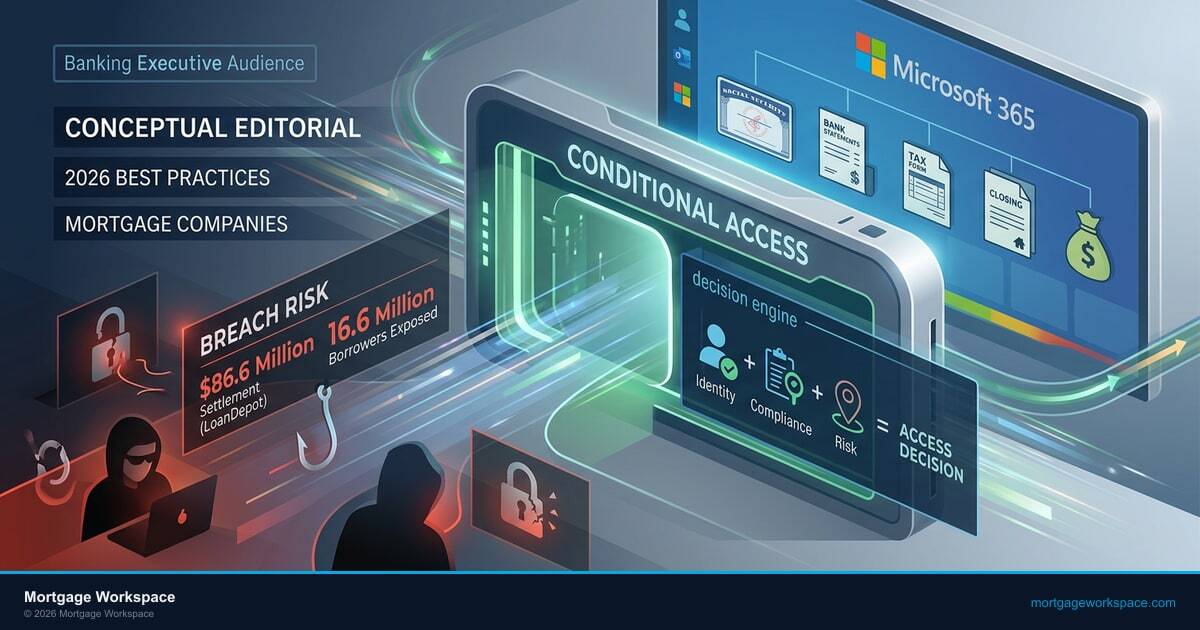
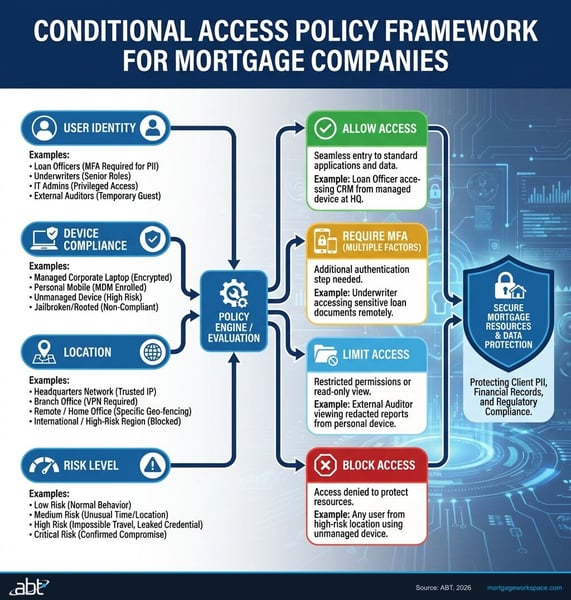
Think of Conditional Access as a decision engine. Every time a user, device, or application requests access to your Microsoft 365 resources, the policy evaluates the request: Is this user who they claim to be? Is their device compliant with your security requirements? Are they connecting from a trusted location? Does their sign-in behavior look normal? Based on those answers, the policy either grants access, blocks access, or requires additional verification.
For mortgage companies, this matters more than most industries. Your Microsoft 365 tenant contains borrower PII, closing documents, wire transfer instructions, and communications with title companies. A single compromised account without conditional access controls can access all of it. With properly configured policies, that same compromised account hits a wall: wrong device, wrong location, wrong risk level. For a broader view of how email-channel threats interact with Conditional Access, see our companion piece on email security for mortgage lenders and the closing-table wire fraud problem.
"Mr. Cooper's 2023 breach affected 14.6 million borrowers. LoanDepot's 2024 attack exposed 16.6 million. Both incidents started with credential compromise. Microsoft Entra ID Conditional Access policies would have introduced additional verification barriers at the point of access."
ABT Mortgage Industry Analysis, 2025 (based on public breach disclosures)Baseline Conditional Access Policies Every Mortgage Company Needs
These five policies form the minimum viable security layer. If your mortgage company has none of these in place, start here.
1. MFA for All Users, No Exceptions
Every user account needs multi-factor authentication enforced through Microsoft Entra ID Conditional Access. That includes loan officers, processors, underwriters, closers, compliance staff, and every administrator. "We'll do it later for the field team" is how breaches happen. Use Conditional Access-based MFA (not legacy per-user MFA) for centralized policy management and better reporting.
2. Block Legacy Authentication
Legacy authentication protocols (POP3, IMAP, SMTP AUTH, ActiveSync basic auth) bypass MFA entirely. If any application in your environment still uses these protocols, it creates a backdoor past every other security control you've built. Create a Conditional Access policy that blocks legacy authentication for all users. Check sign-in logs to identify any legacy connections before flipping the switch.
3. Require Compliant Devices for Data Access
A Conditional Access policy should require device compliance (managed through Microsoft Intune) before granting access to Exchange Online, SharePoint, and Teams. This means the device must meet your organization's minimum security requirements: encrypted storage, current OS, active endpoint protection. Without this policy, a user can access borrower documents from any device, including compromised personal machines.
4. Session Timeout for Inactive Connections
Configure sign-in frequency policies to require reauthentication after periods of inactivity. For mortgage companies handling borrower data, ABT recommends a 12-hour maximum session lifetime for standard users and 4-hour maximum for administrators as a reasonable baseline. Persistent browser sessions should be disabled for any role that accesses borrower PII.
5. Block Sign-Ins from Impossible Travel Locations
Enable sign-in risk detection that flags impossible travel scenarios. If a loan officer signs in from Dallas at 2:00 PM and someone attempts to sign in with the same credentials from Eastern Europe at 2:15 PM, that's a compromised credential. The Conditional Access policy should block the suspicious sign-in and require password reset.
Mortgage-Specific Conditional Access Scenarios
The baseline policies work for any organization. These next scenarios address situations unique to mortgage operations.
Field Loan Officers on Personal Devices
Loan officers visit borrower homes, real estate offices, and branch locations. They need Microsoft 365 access from locations outside your corporate network, often from personal mobile devices. The conditional access approach: create a policy that allows mobile access to Outlook and Teams from personal devices but restricts access to SharePoint document libraries containing borrower files. Personal devices get email and calendar. Borrower documents require a company-managed device with Microsoft Intune compliance.
Remote Processing Teams
Mortgage processors working from home access sensitive documents all day: tax returns, bank statements, credit reports, and closing disclosures. Their conditional access policies should be stricter than field staff: require a compliant, company-managed device with full Microsoft Intune enrollment, restrict access to approved applications only (no browser-based access from personal machines), and enforce session timeouts that prevent documents from remaining accessible on an unattended home workstation.
Third-Party Vendor Access
Title companies, appraisers, underwriting partners, and settlement agents all need some level of access to your systems during the loan lifecycle. Conditional Access handles this through guest access policies: restrict guest users to specific SharePoint sites or Teams channels, require MFA from specific trusted domains only, block guests from downloading documents (view-only access), and set automatic guest expiration (30 or 60 days after the loan closes).
Branch Office vs. Home Office
Define named locations in your Conditional Access policies for each branch office's IP range. Access from a recognized branch IP can proceed with standard MFA. Access from an unrecognized network (home, coffee shop, airport) triggers additional verification: device compliance check plus step-up authentication. This creates a two-tier trust model without blocking remote work entirely.
LOS and POS Application Integration
Your loan origination system (Encompass, Byte, Calyx) and point-of-sale portal may integrate with Microsoft 365 through APIs or service accounts. These service connections need their own Conditional Access policies: restrict the service principal to specific IP ranges (your LOS hosting provider), limit the OAuth permissions to only what the integration requires, and monitor sign-in logs for any anomalous activity from these accounts.
Device Compliance Policies That Protect Borrower Data
Conditional Access decides whether to grant access. Device compliance policies (managed through Microsoft Intune) define what "compliant" means for your mortgage company's devices. These two systems work together: Conditional Access checks the compliance status, Intune determines the compliance requirements. For mortgage companies that already have a layered Microsoft 365 footprint, our complete Microsoft 365 guide for the mortgage industry walks through how Intune, Entra ID, and the Defender suite fit together end-to-end.
Minimum Device Compliance Requirements
For any device accessing borrower data, your Intune compliance policy should require:
- Encrypted storage: BitLocker on Windows, FileVault on macOS, native encryption on iOS/Android. If the device is lost or stolen, borrower data is protected at rest.
- Up-to-date operating system: Set a minimum OS version that excludes known-vulnerable releases. For Windows, require the latest feature update within 60 days of release. For mobile, require the latest major version.
- Active endpoint protection: Microsoft Defender for Endpoint or your approved endpoint protection platform must be running and reporting a clean status.
- Screen lock required: Maximum 5-minute inactivity timeout before the device locks. This prevents unauthorized physical access when a loan officer leaves a device at a borrower's kitchen table.
- Jailbreak and root detection: Any device that has been jailbroken (iOS) or rooted (Android) fails compliance immediately. These modifications bypass the OS-level security controls that protect your Microsoft 365 data.
How Device Compliance and Conditional Access Work Together
When a user attempts to access Microsoft 365 from a device that fails any compliance check, the Conditional Access policy blocks access and displays a remediation message: "Your device does not meet your organization's security requirements." The user can see exactly which requirement failed and take action to fix it (update their OS, enable encryption, etc.) before trying again. Non-compliant device equals no access to borrower data. No manual intervention from IT required.
BYOD vs. Company-Owned Device Strategy
Most mortgage companies have a mix of company-owned laptops (processors, underwriters) and personal devices (loan officers' phones). Intune supports both through different enrollment types:
- Company-owned devices: Full Intune enrollment with complete device management. IT can enforce all compliance policies, deploy applications, and perform full device wipe if needed.
- Personal devices (BYOD): Intune Mobile Application Management (MAM) without full device enrollment. This creates a protected container for Microsoft 365 apps on the personal device. Corporate data stays inside the container and can be selectively wiped without touching personal photos, apps, or data.
Location-Based and Risk-Based Policies for Mortgage Operations
Location and risk policies add intelligence to your conditional access framework. Instead of treating every access request the same, these policies evaluate context and adjust requirements accordingly.
Named Locations
Define your trusted network locations in Microsoft Entra ID:
- Office IP ranges: Each branch office's public IP address or range
- VPN exit points: If loan officers use a corporate VPN
- Hosting provider IPs: Where your LOS and other cloud applications are hosted
Named locations allow policies to differentiate between "employee at the office" and "employee at a coffee shop." Both can access Microsoft 365, but the coffee shop user gets additional verification requirements.
Blocking High-Risk Countries
If your mortgage company operates exclusively in the United States, block sign-ins from countries where you have no employees or business operations. This immediately eliminates a large percentage of credential-stuffing and brute-force attempts. Create exceptions for specific countries if employees travel internationally, but require step-up MFA from those locations.
Sign-In Risk Detection
Microsoft Entra ID Protection assigns a risk level (low, medium, high) to each sign-in based on behavioral analysis:
- Impossible travel: Sign-in from two geographically distant locations within a timeframe that makes physical travel impossible
- Anonymous IP: Sign-in from a VPN, Tor exit node, or other anonymizing service
- Password spray: Multiple failed sign-in attempts across many accounts using common passwords
- Leaked credentials: The user's credentials appeared in a known data breach
Your conditional access policies should respond to each risk level: low risk proceeds with standard MFA, medium risk requires step-up authentication (phone call or FIDO2 key), high risk blocks access and requires password reset with IT verification.
Preventing Wire Fraud BEC Attacks
Wire fraud during mortgage closings is one of the most financially devastating BEC attack scenarios. The attacker compromises a loan officer or title agent's email, then sends modified wire instructions to the borrower. Conditional Access policies help prevent this by ensuring that access to email from unfamiliar devices or locations requires additional verification, making it harder for an attacker with stolen credentials to send emails that appear legitimate. Combine this with Microsoft Defender for Office 365 anti-impersonation policies and mail flow rules that flag outbound messages containing wire transfer language for manual review.
"The FTC Safeguards Rule requires mortgage companies to implement access controls that limit who can access customer information based on their role and need. Microsoft Entra ID Conditional Access policies provide one way to implement this requirement."
FTC Safeguards Rule, 16 CFR Part 314Implementation Roadmap: From Default to Fully Configured in 30 Days
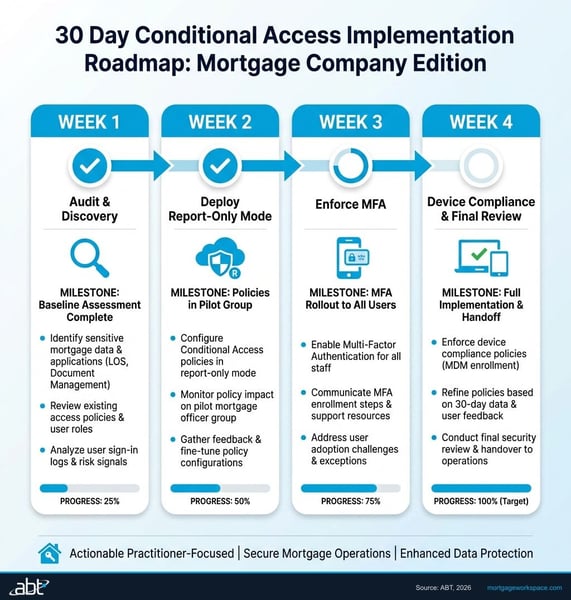
Conditional Access configurations should not be deployed all at once. Microsoft provides a "report-only" mode that logs what each policy would do without actually enforcing it. Use this mode to validate policies before turning them on.
Week 1: Audit Current State and Enable Security Defaults
- Review existing Conditional Access policies (many mortgage companies have none)
- If no policies exist, enable Microsoft Security Defaults as a temporary baseline (MFA for all, block legacy auth)
- Inventory all devices accessing Microsoft 365 (check sign-in logs for device types, OS versions, client apps)
- Identify all legacy authentication connections that need to be migrated
- Document named locations (office IPs, VPN ranges)
Week 2: Deploy Baseline Policies in Report-Only Mode
- Create the five baseline policies (MFA, block legacy auth, device compliance, session timeout, impossible travel)
- Set all policies to "Report-only" mode
- Monitor the sign-in logs to identify any users or applications that would be blocked
- Begin Microsoft Intune enrollment for company-owned devices
- Communicate to staff: "New security policies are coming. Here is what to expect."
Week 3: Review Logs, Adjust Exclusions, Enforce MFA
- Review two weeks of report-only data
- Create exclusion groups for break-glass accounts and any legitimate service connections
- Switch MFA and legacy auth blocking policies from report-only to enforced
- Deploy Intune MAM policies for BYOD loan officer devices
- Configure guest access policies for third-party vendors
Week 4: Enable Device Compliance and Location-Based Controls
- Switch device compliance policy from report-only to enforced
- Enable location-based controls (named locations, country blocking)
- Enable sign-in risk policies (impossible travel, anonymous IP, leaked credentials)
- Configure mortgage-specific scenario policies (field LO, vendor access, LOS integration)
- Document all policies for your compliance records and upcoming audits
Ongoing: Monthly Policy Review
Conditional Access is not a set-and-forget configuration. Review policies monthly to account for new employees, new branch offices, new vendor relationships, and new threat patterns. ABT's M365 Guardian operating model tracks Conditional Access policy changes and alerts on any unauthorized modifications, ensuring your policies stay at your intended security level.
The M365 Guardian Operating Model for Conditional Access
Configuring Conditional Access correctly is the deployment step. Keeping it configured correctly across employee turnover, new branch openings, vendor changes, and Microsoft platform updates is the operating step. The second part is where most mortgage companies lose ground over time, and it is where the M365 Guardian operating model is designed to help.
M365 Guardian is the operating layer ABT applies on top of a customer's Microsoft 365 tenant. For Conditional Access specifically, that layer covers three jobs that a normal IT team rarely has the bandwidth to run consistently. First, baseline enforcement: ABT applies a standard mortgage-industry policy baseline across Microsoft Entra ID, including MFA enforcement, legacy authentication blocking, device compliance requirements through Microsoft Intune, and impossible-travel detection, and then layers your firm's specific scenario policies on top. Second, drift detection: every Conditional Access policy change in the tenant is logged, reviewed against the baseline, and flagged if it weakens the security posture or creates an exclusion that examiners would question. Third, integrated response: when Microsoft Defender for Office 365 or Microsoft Defender for Endpoint surfaces a signal that a user account may be compromised, the Guardian operating model can revoke the user's sessions, force reauthentication, and escalate to ABT's 24x7 security operations team before the credential is used to send a fraudulent wire-transfer email.
This is the layer that turns a one-time Conditional Access project into a continuous operating discipline. For mortgage companies that want to see how the Guardian operating model overlays with Microsoft 365 Copilot rollouts and the rest of the productivity stack, our Microsoft 365 Copilot Buyer's Guide for Mortgage Lenders covers how the same delegated-admin posture supports both security and productivity goals on the same tenant.
Get a Conditional Access Readiness Review for Your Mortgage Tenant
ABT applies the Conditional Access pattern described in this article across 750+ financial institutions, including independent mortgage banks, brokers, and hybrid LO shops. A 30-minute conversation maps your current Microsoft Entra ID policy state, surfaces the gaps your next examiner is most likely to flag, and outlines what the M365 Guardian operating model would cover. No commitment, no quote, no obligation.
Frequently Asked Questions
Conditional Access requires Microsoft Entra ID P1, which is included in Microsoft 365 Business Premium, E3, and E5 licenses. Advanced features like sign-in risk policies and user risk policies require Entra ID P2, available in Microsoft 365 E5 or as a standalone add-on. Most mortgage companies on Business Premium have the baseline Conditional Access functionality they need. The P2 features add risk-based intelligence that is recommended but not strictly required.
The FTC Safeguards Rule requires mortgage companies to implement access controls based on user role and business need, encrypt customer information in transit, use multi-factor authentication for anyone accessing customer data, and monitor for unauthorized access. Microsoft Entra ID Conditional Access policies directly address each of these requirements within Microsoft 365 by controlling who can access what resources, from which devices, and under which conditions. Your Conditional Access policy documentation serves as compliance evidence during audits.
Conditional Access policies reduce wire fraud risk by making it harder for attackers to access compromised email accounts. When an attacker obtains stolen credentials, Conditional Access policies block the sign-in if the device is not compliant, the location is suspicious, or the risk level is elevated. This forces the attacker through additional verification barriers. Combined with Microsoft Defender for Office 365 anti-impersonation policies and mail flow rules that flag messages containing wire transfer language, Conditional Access significantly raises the difficulty of executing a BEC wire fraud attack.
Use Microsoft Intune Mobile Application Management without full device enrollment. This creates a protected container on the personal phone for Microsoft 365 apps like Outlook and Teams. The Conditional Access policy allows access to email and calendar from MAM-protected apps but blocks access to SharePoint document libraries containing borrower files unless the device is fully enrolled and compliant. This gives loan officers mobile access to communication tools while keeping sensitive documents restricted to company-managed devices.
Security Defaults is a one-size-fits-all toggle that enables basic MFA and blocks legacy authentication for all users. It cannot be customized. Microsoft Entra ID Conditional Access policies provide granular control: different requirements for different users, devices, locations, applications, and risk levels. Mortgage companies should use Conditional Access policies instead of Security Defaults because mortgage operations require scenario-specific policies for field loan officers, third-party vendors, and different device types that Security Defaults cannot accommodate.
M365 Guardian is the operating layer Access Business Technologies applies on top of a customer's Microsoft 365 tenant. For Conditional Access specifically, Guardian covers three jobs: applying and maintaining a mortgage-industry policy baseline across Microsoft Entra ID and Microsoft Intune, detecting and flagging drift whenever a policy change weakens the posture or creates an exclusion examiners would question, and integrating with Microsoft Defender for Office 365 and Microsoft Defender for Endpoint so a suspected credential compromise triggers session revocation, forced reauthentication, and 24x7 escalation. ABT applies that operating model for 750+ financial institutions, including mortgage lenders, banks, and credit unions.