In This Article
- Why Mortgage Client Communication Breaks Down
- Why the Native Microsoft 365 Communication Stack Beats Bolt-On CRMs
- How Microsoft 365 Fixes Each Communication Problem
- How ABT Productizes and Secures the Stack with MortgageWorkSpace, Purview, and M365 Guardian
- Setting Up Teams for Mortgage Workflows
- Security and Compliance Configuration
- Automating Follow-Ups with Power Automate
- Implementation Best Practices
- Frequently Asked Questions
Mortgage professionals juggle emails, calls, document requests, and compliance deadlines across dozens of active loans at once. When the communication tools are fragmented, things fall through the cracks. Borrowers wait longer. Compliance risks accumulate. Revenue leaks out of missed follow-ups. The shops that close clean loans on time have stopped trying to glue a CRM, a phone system, a portal, and an email server together. They run on a single Microsoft 365 footprint that handles secure email, video meetings, document sharing, and workflow automation as one connected platform. Access Business Technologies manages Microsoft 365 tenants for more than 750 financial institutions, and mortgage operations are a core part of that footprint.
Why Mortgage Operations Run on Microsoft 365
- Email, voice, video, files, and workflow in one tenant. Outlook, Teams, SharePoint, OneDrive, and Power Automate sit inside the same identity, audit, and governance boundary. The reader does not have to wire seven products together.
- Microsoft Purview retention and DLP applied to mortgage data. Borrower NPI, loan correspondence, and supervisory communications get the same Microsoft 365 control surface examiners already understand.
- MortgageWorkSpace and M365 Guardian as the operating model. ABT productizes the configuration for mortgage shops so loan officers, processors, and underwriters work inside a tenant that is already tuned for GLBA, FTC Safeguards, and state lender obligations.
This guide explains where mortgage client communication actually breaks, why the Microsoft 365 native stack is the right consolidation target instead of yet another bolt-on CRM, what a clean deployment looks like for a mortgage office, and how ABT layers MortgageWorkSpace, Microsoft Purview governance, and M365 Guardian on top of the deployment so the productivity gain shows up without opening a new compliance gap.
Why Mortgage Client Communication Breaks Down
The mortgage origination process pulls together loan officers, processors, underwriters, closers, and sometimes outside counsel. Each role needs different information at different times. Traditional workflows produce four recurring failures.
Information overload. Critical updates get buried in long email threads. A processor misses a condition request because it was sandwiched between two unrelated replies. The borrower hears nothing for three days and calls the realtor.
Fragmented tools. Email lives in one place. Documents live in another. Task lists live in a spreadsheet. Calendar invites go out from a third system. Nobody has a single view of where a loan stands.
Security gaps. Loan officers send borrower Social Security numbers from personal email accounts because the official tools feel slow. Each instance is a GLBA Safeguards Rule violation waiting to be flagged in the next examination.
Missed follow-ups. A borrower submits tax returns. Nobody acknowledges receipt for three days. What should have been a 30-second confirmation turns into a customer service fire that the branch manager has to put out.
Why the Native Microsoft 365 Communication Stack Beats Bolt-On CRMs
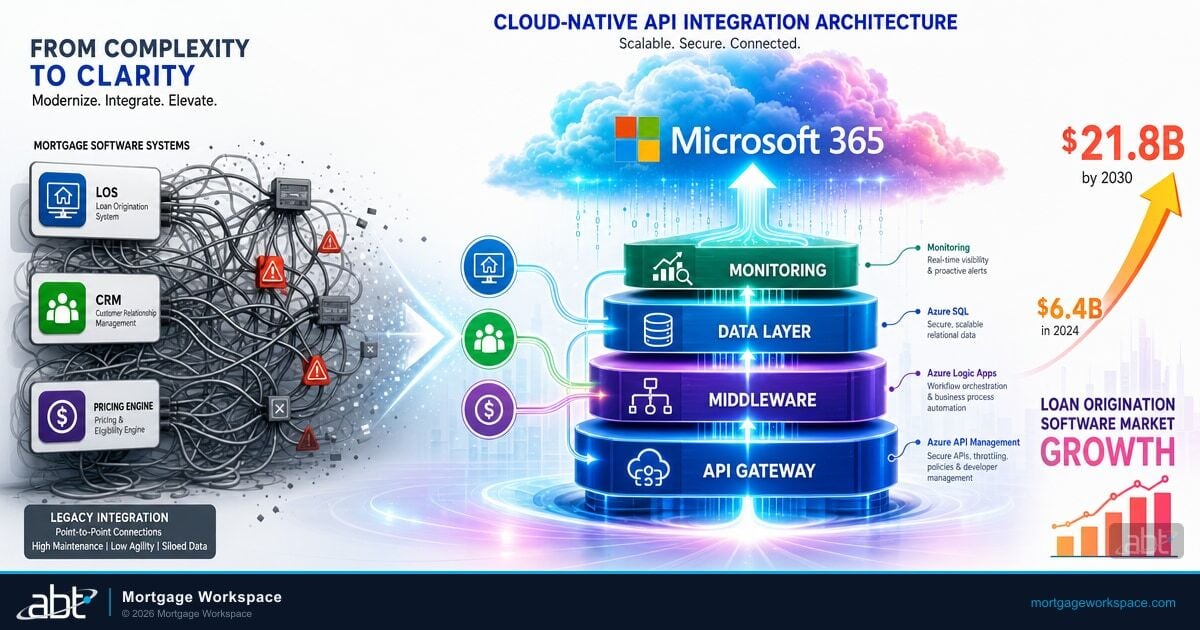
The dominant pattern in the mortgage industry is to buy a CRM and bolt it onto an email server, then add a phone system, then add a portal, then add a document storage tool, then add a workflow engine. Each tool authenticates against a different directory. Each tool produces its own audit log. Each tool ships its own retention policy. By the time a compliance officer wants a 24-month communication history for a single borrower, the answer is a six-vendor scavenger hunt with six different export formats and six different gaps. The shops that actually close clean loans on time stopped fighting that pattern years ago. They picked Microsoft 365 as the platform and let Outlook, Microsoft Teams, SharePoint, OneDrive, and Microsoft 365 Copilot do the work the bolt-on stack was supposed to do. One identity in Microsoft Entra ID. One audit log in Microsoft Purview. One retention policy across every channel a borrower or a loan officer touches. Copilot drafts the follow-up email, summarizes the Teams call with the underwriter, and finds the missing condition in SharePoint without ever leaving the tenant. That is the native communication stack a mortgage shop is buying with a single Microsoft 365 license, and it is the consolidation target nobody has to rip and replace later. We cover Microsoft 365 for Mortgage Industry in a companion piece.
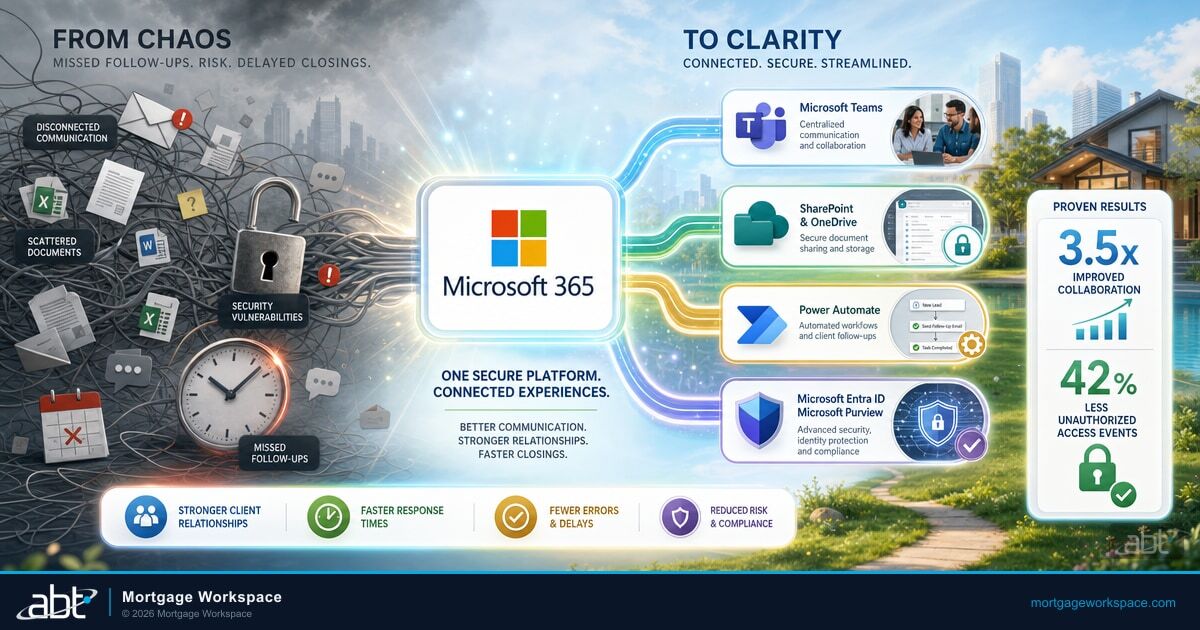
Microsoft 365 consolidates the mortgage communication stack into one tenant: Microsoft Outlook for borrower-facing email with encryption applied automatically, Microsoft Teams for processor-underwriter coordination and recorded video calls, Microsoft SharePoint and Microsoft OneDrive for loan file storage and borrower upload portals, Microsoft Power Automate for the milestone notifications that drive borrower confidence, and Microsoft 365 Copilot for the loan officer's draft-and-summarize work inside every one of those apps. Microsoft Entra ID supplies the identity layer, Microsoft Purview applies retention and DLP across the whole tenant, and Microsoft Defender guards the inbox and the device. ABT layers MortgageWorkSpace, Microsoft Purview governance tuned to mortgage data, and M365 Guardian on top so the mortgage shop gets a Microsoft 365 footprint already configured for the loan workflow.
How Microsoft 365 Fixes Each Communication Problem
Centralized Coordination with Microsoft Teams
Microsoft Teams replaces email threads, phone tag, and scattered instant messages with a single workspace. Create a channel for each loan pipeline stage. Pin critical documents. Tag specific team members when their input is needed. Loan officers see every update in one place, processors post conditions directly inside the loan channel, underwriters respond without leaving the platform, and the entire conversation history is searchable and auditable for the next examination.
Secure Document Sharing with SharePoint and OneDrive
SharePoint sites organized by loan type or branch give every team member access to the right documents with the right permissions. OneDrive handles individual file storage with enterprise-grade encryption. There is no business reason to email W-2s as unencrypted attachments anymore. Set up a SharePoint document library with borrower-specific folders. Grant borrowers upload access through a secure link. Every upload is encrypted, logged, and retained under the firm's compliance policy.
Encrypted Communication by Default
Microsoft 365 provides end-to-end encryption for Teams calls, email through Exchange Online, and files at rest in SharePoint. For mortgage companies subject to GLBA, the FTC Safeguards Rule, and state-level privacy regulations, this is a baseline requirement, not an option. Microsoft Purview Data Loss Prevention policies automatically detect and block sensitive data like Social Security numbers from being shared outside approved channels, which closes the off-channel gap that recurs in lender exam findings.
Automated Status Updates with Power Automate
Microsoft Power Automate triggers notifications when specific events occur. A borrower uploads a document. An underwriter clears a condition. A closing date gets scheduled. Each event triggers the right notification to the right person without the loan officer manually sending updates.
Draft and Summarize with Microsoft 365 Copilot
Microsoft 365 Copilot sits inside Outlook, Teams, SharePoint, and OneDrive. A loan officer can ask Copilot to draft the borrower update, summarize the underwriter's Teams call, find the missing W-2 in the SharePoint folder, and produce the next-step checklist in seconds. Because Copilot runs inside the same tenant as the rest of the communication stack, every prompt and response stays inside the firm's Microsoft 365 boundary and inherits the firm's Microsoft Purview retention, DLP, and audit configuration.
How ABT Productizes and Secures the Stack with MortgageWorkSpace, Purview, and M365 Guardian
Buying Microsoft 365 is the easy part. The work is in configuring it for the loan workflow without opening a compliance gap, and that is the work mortgage shops outsource to ABT. MortgageWorkSpace is the dual-brand mortgage vertical ABT operates on top of Microsoft 365, with the tenant pre-configured for mortgage roles, mortgage data classifications, and the loan origination system integrations that generic Microsoft 365 deployments skip. Microsoft Purview is the governance layer ABT tunes to mortgage data: retention policies aligned to state and federal lender record-keeping rules, Data Loss Prevention tuned to borrower NPI patterns rather than generic Microsoft templates, Communication Compliance review queues calibrated to the off-channel patterns mortgage examiners actually cite, and the audit log retention that produces ready-to-use evidence when a state regulator or the CFPB calls. M365 Guardian is ABT's operating model on top of all of it, with the 24/7 security operations center watching the Microsoft Defender and Microsoft Sentinel signals every minute of the day. The mortgage shop keeps its Microsoft 365 license and its tenant ownership. The MortgageWorkSpace plus Purview plus M365 Guardian layer is what ABT adds, under a Tier-1 Cloud Solution Provider relationship with Granular Delegated Administrative Privileges (GDAP) scoped to least-privilege roles.
Microsoft 365 is the platform. MortgageWorkSpace, Microsoft Purview, and M365 Guardian are how the productivity gain shows up without opening a compliance gap.
Setting Up Microsoft Teams for Mortgage Loan Pipelines
The most effective mortgage Teams configurations use channels that mirror the loan workflow.
Branch-wide announcements, policy updates, rate changes, and the running list of items the entire office needs in front of them at the same time.
New leads, initial document collection, credit pulls, and the early-pipeline conversations between the loan officer and the borrower's referral source.
Active loans, condition tracking, document requests, and the processor-to-loan-officer back-and-forth that used to happen in a 47-message email thread.
Submissions, condition clearance, decision communication, and a searchable record of the underwriter's reasoning for the next quality-control review.
Scheduling, final document preparation, funding confirmation, and the moment-of-close coordination that touches the title company, the closer, and the loan officer.
Audit requests, regulatory updates, training announcements, and the running list of items the compliance officer wants the office tracking in real time.
Pin a Microsoft OneNote notebook in each channel for running notes. Use Microsoft Planner tabs for task tracking. The combined pattern replaces spreadsheets, sticky notes, and the loan officer's memory as the system of record.
Security and Compliance Configuration for Mortgage Teams
Microsoft 365 includes compliance tools built for regulated industries. Mortgage companies should configure these within the first week of deployment.
Multi-Factor Authentication. Enable Microsoft Entra ID Conditional Access policies in Grant mode for every user account. The FTC Safeguards Rule expects multi-factor authentication for any individual accessing customer information. There is no valid reason to skip this.
Microsoft Purview Data Loss Prevention. Create policies that detect borrower personally identifiable information including Social Security numbers, account numbers, and driver's license numbers. Block external sharing of files containing this data. Alert the compliance officer when violations occur.
Microsoft Purview retention policies. Configure email and Microsoft Teams message retention to match state and federal lender requirements. GLBA, the FTC Safeguards Rule, and state-specific mortgage regulations all carry retention requirements. Set policies once and let the Microsoft 365 tenant enforce them.
Microsoft Entra ID Conditional Access. Restrict login from unmanaged devices. Require compliant devices for access to sensitive SharePoint sites. Block legacy authentication protocols that bypass multi-factor authentication.
Microsoft Compliance Manager. Track the firm's score against FFIEC, GLBA, and other frameworks. Compliance Manager provides specific actions to improve the firm's compliance posture with step-by-step guidance the IT team and the compliance officer can work from together. For ABT's fuller take, see Migrating to Microsoft 365.
Automating Client Follow-Ups with Microsoft Power Automate
Manual follow-ups are where mortgage communication fails most often. Microsoft Power Automate eliminates the problem.
1. Document receipt confirmation. When a borrower uploads a file to a SharePoint folder, Power Automate sends an email confirmation within minutes. The borrower knows the documents arrived. The loan officer does not spend the morning sending acknowledgment emails.
2. Milestone notifications. When a loan status changes in the firm's pipeline tracking system, Power Automate notifies the borrower, the realtor, and the loan officer. Everyone stays informed without anyone sending updates manually.
3. Stale file alerts. If a loan file has no activity for 48 hours during active processing, Power Automate alerts the processor and the processing manager. Loans do not sit untouched because someone forgot about them.
Implementation Best Practices for Mortgage Companies
Start with one branch. Roll out Microsoft 365 to a single branch first. Document what works, what needs adjustment, and what training gaps exist. Then expand to additional branches with a proven playbook.
Train by role, not by feature. Loan officers need different training than processors. Show each role exactly how the tools apply to their daily work. A 45-minute role-specific session beats a 3-hour generic overview.
Configure security before granting access. Set up multi-factor authentication, Microsoft Purview DLP policies, and retention rules before any user logs in. Retrofitting security after the office has been using the system is harder and riskier.
Work with a Tier-1 CSP that knows mortgage. Generic IT consultants can stand up Microsoft 365. They cannot configure it for GLBA Safeguards Rule alignment, loan origination system integration, or mortgage-specific workflows. ABT is a Tier-1 Microsoft Cloud Solution Provider that has configured Microsoft 365 for more than 750 financial institutions, with MortgageWorkSpace running on top for the mortgage vertical. This connects closely to Taming Your Leads: A Mortgage Pro's Guide to Dynamics 365.
Key Takeaway
Mortgage client communication does not fail because the tools are missing. It fails because the tools are fragmented. Microsoft 365 consolidates email, video, document sharing, workflow, and Copilot into a single tenant with a single identity, a single audit log, and a single retention policy. ABT productizes that tenant for mortgage shops with MortgageWorkSpace, tunes Microsoft Purview governance to mortgage data, and runs M365 Guardian over the top so the productivity gain shows up without opening a compliance gap.
Get a MortgageWorkSpace Communication Stack Review
ABT runs the Microsoft 365 communication pattern described in this article for mortgage shops operating across multiple branches, affiliated entities, and remote loan officers. A 30-minute conversation maps the current tools, surfaces the gaps the next examiner is most likely to flag, and outlines what a MortgageWorkSpace plus Microsoft Purview plus M365 Guardian deployment would cover for the firm. No commitment, no quote, no obligation.
Frequently Asked Questions
Before any borrower communication flows through Microsoft 365, configure message encryption for all external emails containing personally identifiable information, set up Exchange Online transport rules that automatically apply encryption when Social Security numbers or account numbers are detected, enable Microsoft Purview Audit logging on all mailboxes to create a defensible record of every message sent and received, and configure Microsoft Purview retention policies that match the firm's state and federal record-keeping obligations. These settings take effect across Outlook and Microsoft Teams together, so internal and external communication channels are both protected from the first message.
Microsoft Teams supplements email rather than replacing it entirely. External borrower communication typically stays in Outlook with encryption enabled, where borrowers expect it. Internal coordination between loan officers, processors, underwriters, and closers moves into Microsoft Teams channels organized by loan pipeline stage. The separation keeps borrower-facing messages in the email channel borrowers already know while moving internal coordination to a faster, more organized platform that produces a searchable conversation history examiners can use.
Microsoft 365 Business Premium is the practical floor for a mortgage shop. It includes Microsoft Teams, Exchange Online, SharePoint, OneDrive, Microsoft Intune device management, and Microsoft Defender for Office 365. Larger organizations with advanced compliance needs may move to Microsoft 365 E3 or E5 for capabilities like advanced eDiscovery, insider risk management, and Microsoft Sentinel integration. ABT walks shops through the license decision under the MortgageWorkSpace operating model so the firm pays for what the loan workflow actually uses, not for shelfware.
A single-branch Microsoft 365 deployment with email migration, security configuration, and team training typically takes four to six weeks. Multi-branch rollouts take eight to twelve weeks depending on the number of locations and the complexity of the existing systems being replaced. Working with a Tier-1 Microsoft Cloud Solution Provider that specializes in financial services shortens the timeline because the compliance configuration is already documented in the MortgageWorkSpace operating model and does not have to be rebuilt for every shop.
Microsoft 365 Copilot sits inside Outlook, Microsoft Teams, SharePoint, and OneDrive. A loan officer can ask Copilot to draft the borrower follow-up email, summarize a recorded Microsoft Teams call with the underwriter, find the missing W-2 in the borrower's SharePoint folder, and produce a closing-week checklist for the processor. Because Copilot runs inside the same tenant as the rest of the Microsoft 365 communication stack, every prompt and response inherits the firm's Microsoft Purview retention, Data Loss Prevention, and audit configuration. ABT configures Copilot under the M365 Guardian operating model so the productivity gain does not introduce a new data classification gap.
MortgageWorkSpace is the dual-brand mortgage vertical Access Business Technologies operates on top of Microsoft 365. The shop keeps its Microsoft 365 licensing and retains tenant ownership. ABT delivers MortgageWorkSpace as a Tier-1 Microsoft Cloud Solution Provider, with the tenant pre-configured for mortgage roles, mortgage data classifications, loan origination system integrations, and the Microsoft Purview governance and M365 Guardian operating model that mortgage compliance officers and IT directors need running every day. The result is a Microsoft 365 footprint already tuned for the loan workflow, with the security and compliance layer wired in from day one.